Template details
Bilingual Astro Editorial Template
A cinematic bilingual Astro starter for book launches, author portfolios, and editorial projects, with WebGL particle effects.
About this template
Bilingual Astro Editorial Template is a free Astro and TypeScript starter that generates a static Spanish/English editorial landing site for books, author portfolios, and creative projects, using a WebGL space scene and particle-rendered title instead of a CMS.
What is the Bilingual Astro Editorial Template?
It is a static-site starter built on Astro 7.x with TypeScript output, maintained by EloyEMC and derived from Astro's Space theme. You supply localized editorial copy, book or project data, artwork, and legal text; the build produces a static site in dist/ with paired /es/ and /en/ routes. No CMS, database, or runtime API is required, and the repository ships generic example data so branding, links, and artwork can be swapped for a real project.
What makes it stand out?
- Astro static generation —
npm run buildemits a static site intodist/, deployable without a Node runtime;npm run checkruns Astro and TypeScript diagnostics first. - Bilingual routing — parallel
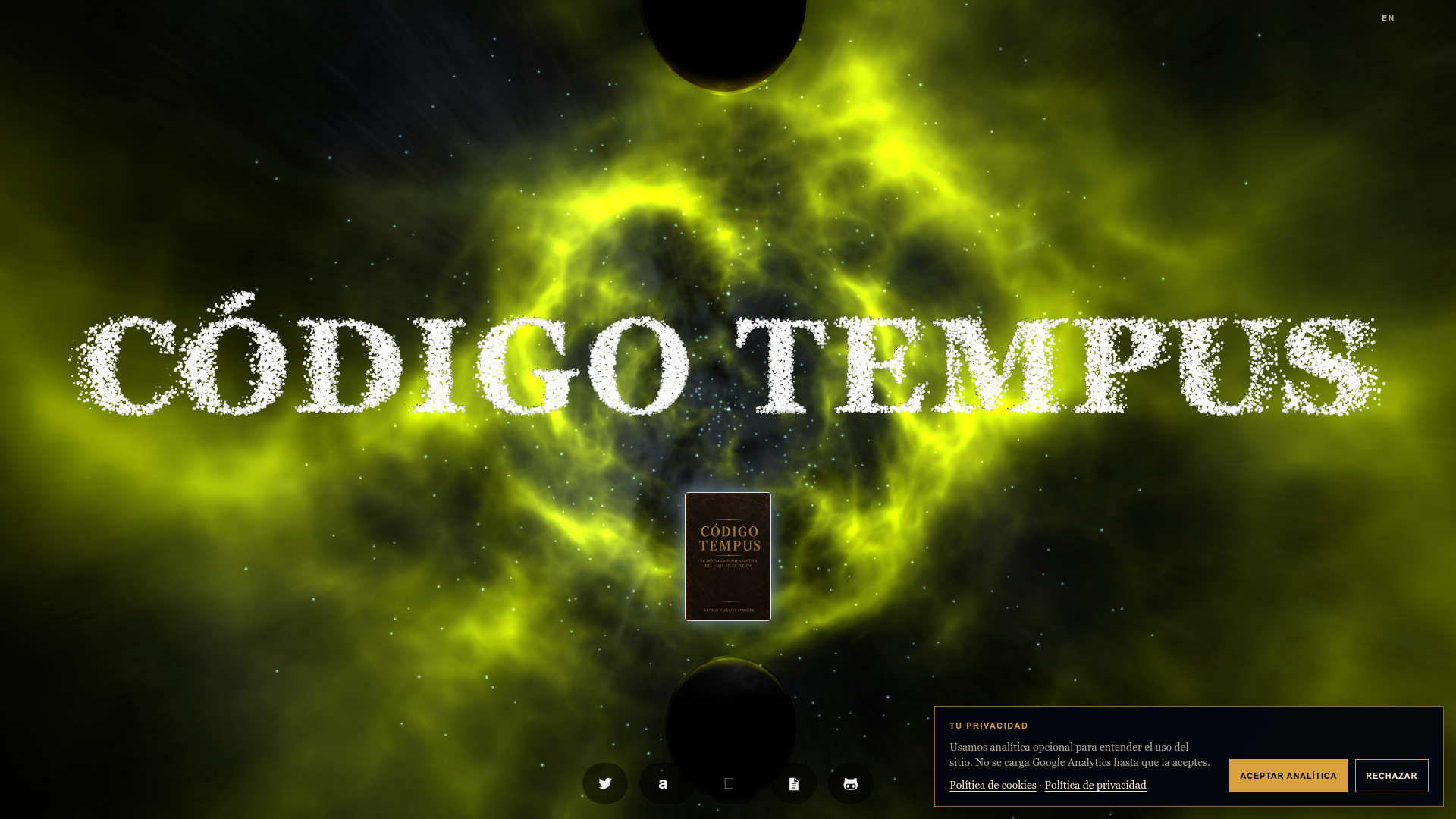
/es/and/en/page trees with canonical and alternate-language metadata in the shared layout. - Immersive WebGL homepage — a full-screen dark space scene with a particle-based title that reacts to pointer movement, plus an animated wormhole transition.
- Floating cover entry point — a book or project cover image acts as the primary call to action, with localized purchase, legal, and attribution links below it.
- Accessible fallbacks — semantic text and static fallbacks render on reduced-motion settings or devices without WebGL support, alongside focus states and responsive navigation.
- Consent and legal pages — localized cookie consent, legal, and third-party attribution pages, with example text split into
src/data/legal.ts. - Separated content layer — editorial data lives in
src/data/books.ts, routes insrc/pages/, layouts insrc/layouts/, presentation components insrc/components/, styles insrc/styles/, interaction scripts insrc/scripts/, and replaceable artwork inpublic/media/. - Language switcher — visitors move between
/es/and/en/without losing context on the current page.
Who should use it?
- Authors launching a bilingual book — publish a cinematic landing page in Spanish and English with localized purchase links and legal copy.
- Illustrators and designers — replace the example SVG artwork in
public/media/and point the floating cover at their own portfolio piece. - Creative studios and narrative projects — use the space scene, particle title, and wormhole transition as the visual frame for a single editorial release.
- Developers who want a static editorial starter — customize TypeScript data files and Astro components without configuring a CMS or backend.
What can you do with it?
- Indie authors: ship a launch page for a new title with
/es/and/en/versions, a cover dossier modal, and localized call-to-action links. - Portfolio owners: repurpose the immersive home scene as an entry point to a project detail route with cover, title, description, and metadata.
- Small studios: adapt the cookie consent, legal, and third-party attribution pages instead of writing compliance pages from scratch.
How does it work?
- Run
npm installthennpm run dev, and open the local server athttp://localhost:4321/es/orhttp://localhost:4321/en/. - Replace the example content in
src/data/books.tsandsrc/data/legal.ts, swap thepublic/media/template-cover-*.svgartwork, and set the production origin inastro.config.mjs. - Review
THIRD_PARTY_NOTICES.md, then runnpm run buildandnpm run previewto check the static output.
FAQ
Is the Bilingual Astro Editorial Template free?
The template-owned scaffolding is released under the MIT License. The bundled Wormhole Extreme scene and three.js keep their own licenses and attribution requirements, so THIRD_PARTY_NOTICES.md must be reviewed before redistributing a customized version.
Does it require a CMS or database?
No. All editorial, legal, and attribution content sits in TypeScript data files under src/data/, and the build produces a static site with no runtime API or database dependency.
Which languages are supported?
The starter ships Spanish and English route trees at /es/ and /en/, with canonical and alternate-language metadata generated in the shared layout and a switcher that preserves the current page context.
What happens on devices without WebGL?
The homepage keeps semantic text and static fallbacks, and reduced-motion preferences are respected, so the page stays readable when the particle title and space scene cannot render.