Template details
Eleventy Agile Blog
A minimal Eleventy blog template that implements a personal agile development workflow with sprints and a backlog.
About this template
eleventy-agile-blog is a minimal blog template built on Eleventy that turns a static blog into a personal agile development workflow manager, using markdown files and blog posts to track sprints, backlog, and done stories.
What is eleventy-agile-blog?
eleventy-agile-blog is a static site template for Eleventy, based on the official eleventy-base-blog. It takes markdown files as input and generates a multi-page blog with dedicated pages for sprints, backlog, done stories, an archive, and an about page. The template is maintained by Mark J. Smith and is designed for solo developers who want a lightweight, file-based alternative to dedicated agile project management tools. It can run locally with npm or be deployed to a static host like Netlify.
Key Features
- File-based workflow — Everything is managed in files: sprints, stories, and blog posts are plain markdown, so there is no database or external service dependency.
- Eleventy foundation — Built on the official eleventy-base-blog starter, using the 11ty static site generator; the README notes the main difference is the use of src and dist folders for easier navigation.
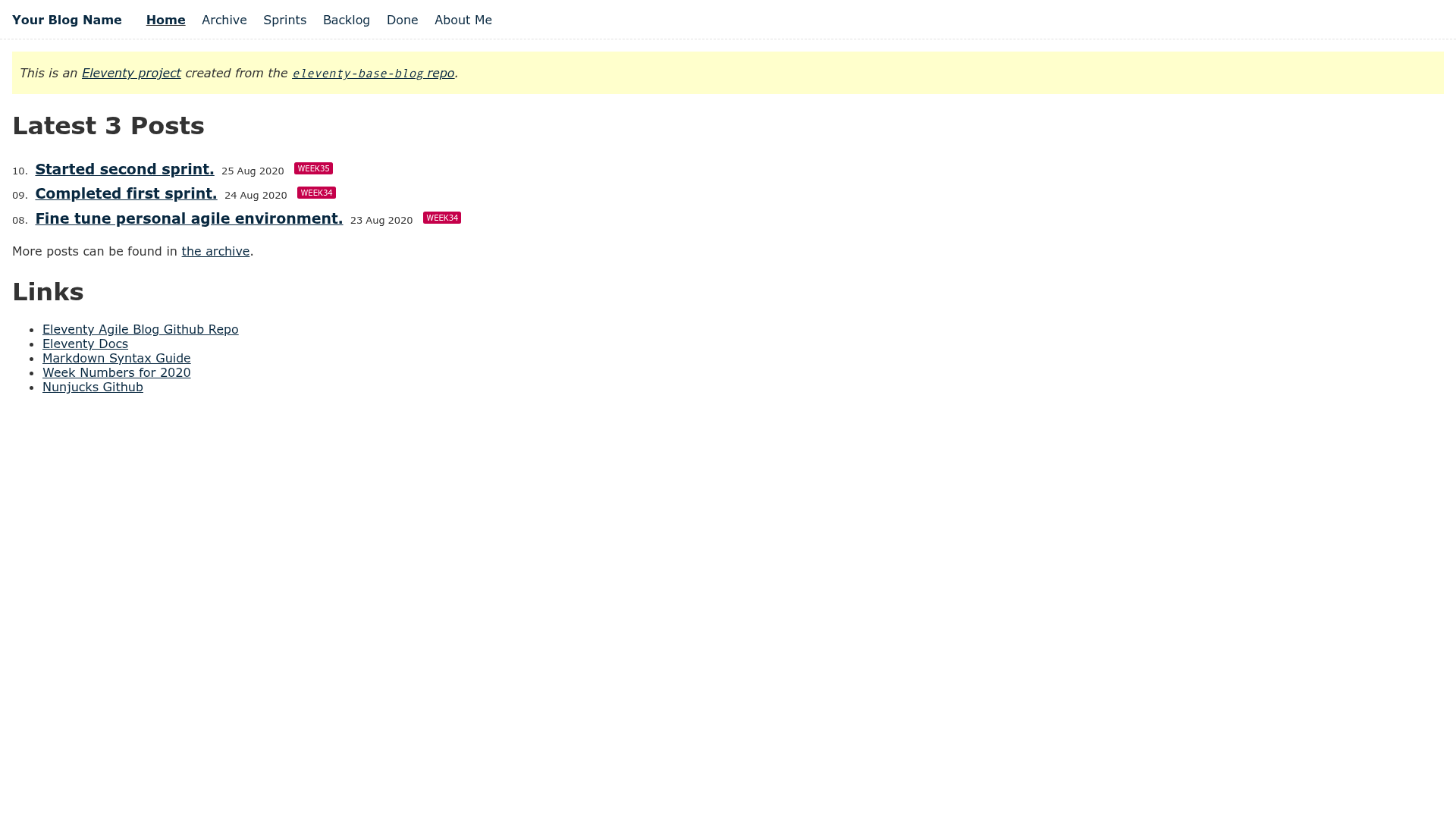
- Dedicated agile pages — The blog includes Home, Archive, Sprints, Backlog, Done, and About Me pages; sprints and backlog/done tags route stories to the right sections.
- Tag-based story tracking — Add the 'backlog' tag to a story to list it on the backlog page, and the 'done' tag to list it on the done page.
- One-week sprint model — The workflow described in the README defines sprints lasting 1 week, with a retrospective and planning step at each week's end.
- Git-friendly branching workflow — The README recommends a branching pattern: create a week branch (e.g. week34), story branches from it, merge story branches into the week branch, then merge back to master.
- Zero-config static output — Because it is just Eleventy, the output is plain HTML/CSS/JS with no server-side requirements.
Who is it for?
- Solo developers — Manage personal coding projects without the overhead of Jira or Trello; everything lives in markdown and git.
- Eleventy beginners — Learn how the 11ty static site generator works by customizing a minimal, documented template based on the official starter.
- Writers and task managers — Use the same sprint/backlog structure to organize any set of tasks or writing commitments, not just code.
What can you do with it?
- Run a weekly sprint cycle — Create sprints as markdown files, assign stories, work through them, and move completed ones to done using tags.
- Publish a personal blog — Write blog posts describing what you did and embed the agile workflow into the same site, using the Home page to show the 3 latest posts.
- Deploy publicly on Netlify — The template is static, so it can be hosted anywhere; the demo runs on Netlify.
How does the agile development workflow work?
The README describes a file-based agile process. Users write blog posts to record what they did and what they plan to do, then create "stories" added to the "backlog". Stories are assigned to one-week "sprints", implemented, and moved to "done" when complete. At the end of each week, users write a retrospective and plan the next sprint. Getting started involves cloning the repo, running npm install and npm start, and updating the Eleventy config with your details.
FAQ
What is eleventy-agile-blog?
It is a minimal Eleventy blog template that adds an agile development workflow. It produces static HTML pages from markdown and includes separate sections for sprints, backlog, done stories, and an archive.
How do I add a story to the backlog?
Create a new markdown file in the stories section and add the tag 'backlog' to its front matter. The Backlog page automatically lists all stories with that tag.
Can I deploy it to Netlify?
Yes. The template outputs a static site with no server-side dependencies, so it can be deployed to Netlify or any static host. A live demo is linked from the repository.
Is it for teams or solo developers?
The README explicitly states that there are many great team tools for agile development; this template is described as a way to manage your own development. It is intended for individual use.
What is the sprint duration used in the template?
The workflow described in the README uses one-week sprints. At the end of each week, the author writes a retrospective and plans the next sprint.