Template details
Feedback
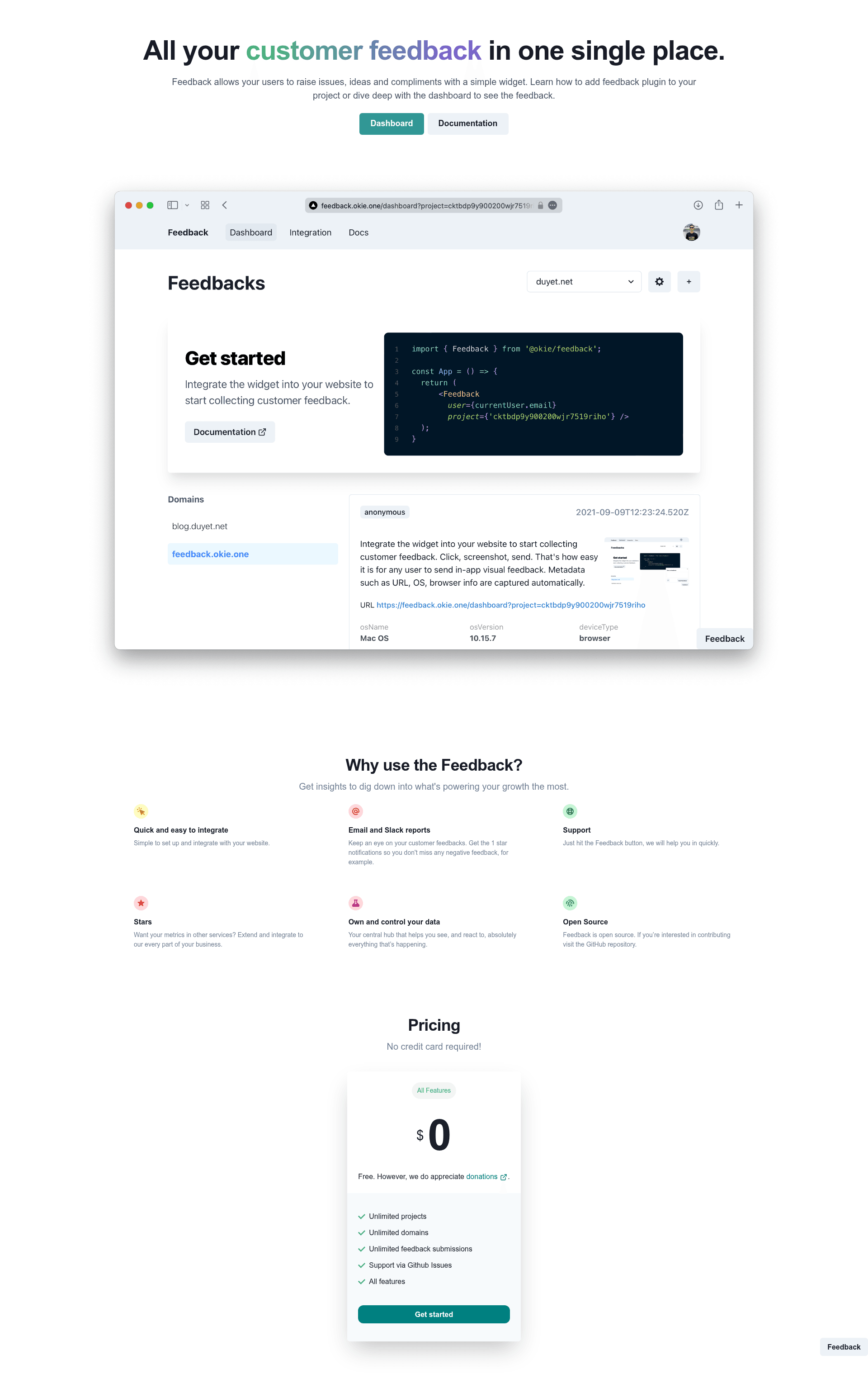
Feedback is a platform built with Next.js, TypeScript & Prisma to collect issues, ideas, and compliments.
About this template
Feedback is an open-source feedback platform built with Next.js 16, TypeScript, and Prisma that collects issues, ideas, and compliments from users through an embeddable widget and a management dashboard.
What is Feedback?
Feedback is a monorepo containing three parts: a Next.js 16 dashboard, a Nextra documentation site, and an embeddable widget. It accepts user submissions through a CORS-enabled REST API or the widget component, stores them in PostgreSQL via Prisma 6, and displays them in a dashboard with search, filtering, and pagination. The project is maintained by Duyet Le and is released under the MIT license.
Key Features
- Embeddable widget — a React component (currently a work in progress) that any website can integrate with a project ID and a title to capture feedback, including screenshot capture.
- Dashboard — project management with search, filtering, and pagination over feedback entries, built on Next.js Pages Router and Chakra UI v3.
- Team collaboration — invite team members through the API and assign role-based access as owner or member.
- Integrations — Slack webhooks and email notifications via SendGrid or SMTP, configured through environment variables.
- Authentication — NextAuth v4 with GitHub OAuth, Google OAuth, and magic email link options.
- Security — rate limiting, CORS, input validation, and query parameter normalization on API endpoints.
- Docker setup — docker-compose brings up PostgreSQL with auto-migrations, the dashboard with hot reload, and the docs site with one command.
- REST API — endpoints for submitting feedback, listing with pagination, deleting entries, and managing projects and invitations, with all authenticated endpoints requiring a valid NextAuth session.
Who is it for?
- SaaS founders — collect and triage user feedback during beta without building a feedback system from scratch.
- Product managers — organize incoming ideas and compliments into a searchable dashboard and share them via Slack or email.
- Developers — self-host a feedback platform and extend it, since the codebase is MIT-licensed and uses TypeScript strict mode with CI via GitHub Actions and Lighthouse CI.
- Open-source maintainers — accept feedback from the community with OAuth login and role-based team permissions.
What can you do with Feedback?
- Collect structured feedback: embed the widget with a project ID and a title to capture issues, ideas, and compliments with optional screenshots.
- Manage submissions: search, filter, and paginate through feedback in the dashboard, and delete entries you no longer need.
- Notify your team: connect Slack webhooks or email (SendGrid/SMTP) so new feedback triggers notifications.
- Run a multi-app setup: start the dashboard and docs together via docker-compose, or deploy the dashboard to Vercel with environment variables.
How does Feedback work?
Feedback stores each submission as a record in PostgreSQL using a Prisma schema. When a user submits via the widget or the POST /api/feedback endpoint, the entry is saved and can be retrieved through the list endpoint with pagination and search. The dashboard authenticates users with NextAuth and restricts project management actions to authorized roles.
Alternatives
Canny, a hosted product-feedback tool with public voting boards and roadmap features.
FAQ
Is Feedback free?
Yes, the project is open source under the MIT license and can be self-hosted at no cost, though you pay for your own hosting services like Vercel and a PostgreSQL instance.
What technologies does Feedback use?
Feedback uses Next.js 16 with Pages Router, React 19, Chakra UI v3, TypeScript 5, Prisma 6 with PostgreSQL, NextAuth v4, and Nextra for documentation.
How do I run Feedback with Docker?
Clone the repository, run docker-compose up -d, and access the dashboard at localhost:3000 and docs at localhost:3001. PostgreSQL is included with auto-migrations.
Does Feedback support team collaboration?
Yes, you can invite team members through the API and assign them owner or member roles. The dashboard uses these roles to control project management actions.
Can I deploy Feedback to Vercel?
Yes, the dashboard has a Deploy with Vercel button that clones the repo and prompts for required environment variables like GITHUB_ID, GOOGLE_ID, DATABASE_URL, and NEXTAUTH_URL.