Template details
Hexo Theme Academia
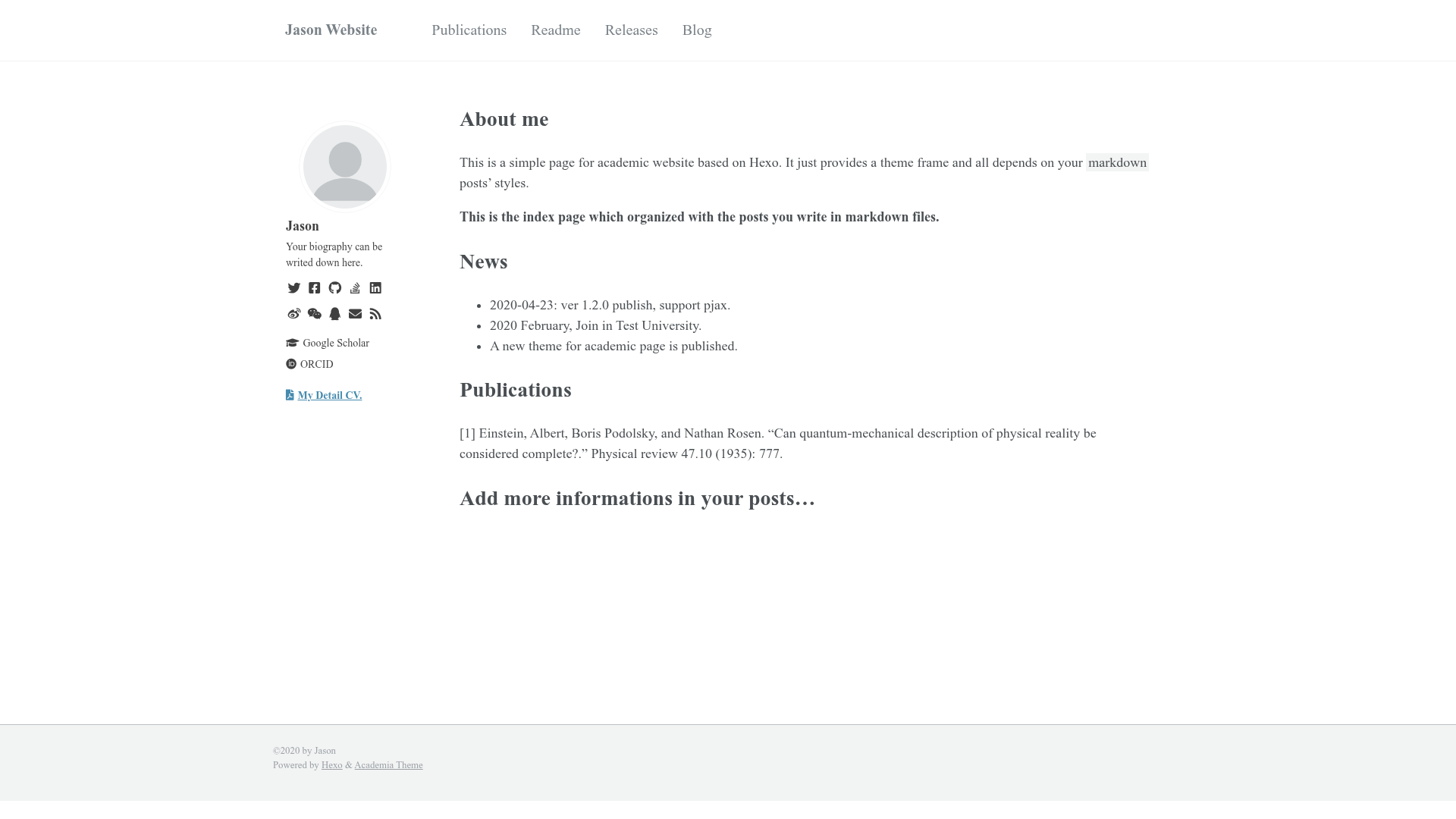
A light, simple, responsive Hexo theme for academic websites, crafted from academicpages on Jekyll.
About this template
Hexo Theme Academia is a light, responsive Hexo theme for building academic personal websites, ported from the Jekyll academicpages project by PhosphorW.
What is Hexo Theme Academia?
Hexo Theme Academia is a Hexo theme that renders academic information using only Hexo's post and page content types. It takes markdown posts with academia: true in the front-matter and outputs a clean, responsive index page plus standalone pages. The theme runs on Hexo 3.1 and above and requires the hexo-renderer-pug and hexo-renderer-stylus renderers. It is distributed under the MIT license and its example site is phosphorw.github.io.
Key Features
- Simple content model — Only uses Hexo
postandpagetypes; posts withacademia: truein front-matter appear on the home page automatically, so you can split your bio and research info across one or many posts. - Sidebar profile — The sidebar supports an avatar, social links, optional extra social links, and a CV download link, all configured in the theme
_config.yml. - Flexible top menu — Configure in-page anchors, new-page links, or any URLs through the theme configuration.
- Font Awesome 5 icons — All icons use Font Awesome 5 (upgraded from FA4 since v1.2.1); icon classes must be
fasorfab. - Data-file updates — Since v1.2.0, copy the theme config to
/source/_data/theme.ymlsogit pullupdates do not overwrite your customizations. - PJAX support — Added in v1.2.0 for faster navigation between pages.
- RSS integration — Works with the
hexo-generator-feedplugin to generate anatom.xmlfeed. - Box-shadow mode — An optional visual toggle in the theme config.
Who is it for?
- Academic researchers and faculty — Publish a personal academic page covering publications, teaching, and contact details without a full CMS.
- Graduate students — Set up a professional online presence quickly with a CV download link and social profile links.
- Hexo users who want an academic design — Switch from a general blog theme to a focused academic layout using familiar Hexo workflows.
What can you do with it?
- Publish an academic profile — Write your biography, research interests, and selected publications in markdown posts and have them displayed on the index page.
- Add standalone pages — Use
hexo n page "title"for dedicated pages like teaching, projects, or a full CV as a static page. - Customize navigation — Add links to your Google Scholar, LinkedIn, or other external profiles via the top menu configuration.
- Keep your setup updated — Use the data-files configuration so theme updates don't clobber your site's settings.
How does it work?
Install the theme by cloning the repository into themes/Academia, then run npm install hexo-renderer-pug hexo-renderer-stylus --save and set theme: Academia in your site's _config.yml. Create posts or pages with hexo n post "any title" or hexo n page "any title", and add academia: true to the front-matter of any post you want shown on the home page. For updates, copy the theme _config.yml to /source/_data/theme.yml, and restart the Hexo server after any config change.
FAQ
Is Hexo Theme Academia free?
Yes, it is open source under the MIT license and the source code is public on GitHub.
Does the theme support RSS?
Yes, if you install the hexo-generator-feed plugin, the theme can link to an atom.xml feed. The Q&A in the README also lists atom.xml as an example special URL.
Can I still use Font Awesome 4 icons?
Since v1.2.1, font-awesome-4 is no longer used. If you upgrade manually, you need to change the CDN stylesheet to FA5 and change your icon classes from fa to fas or fab.
How do I keep my configuration when updating the theme?
Use the data-files method: copy the theme _config.yml to /source/_data/theme.yml (create the _data folder if needed). After changes, restart the Hexo server to apply them. Check the release page for any config changes before updating.
What Hexo version is required?
The README badge states Hexo 3.1 and higher, and the theme relies only on post and page content types.