Template details
astro-vim
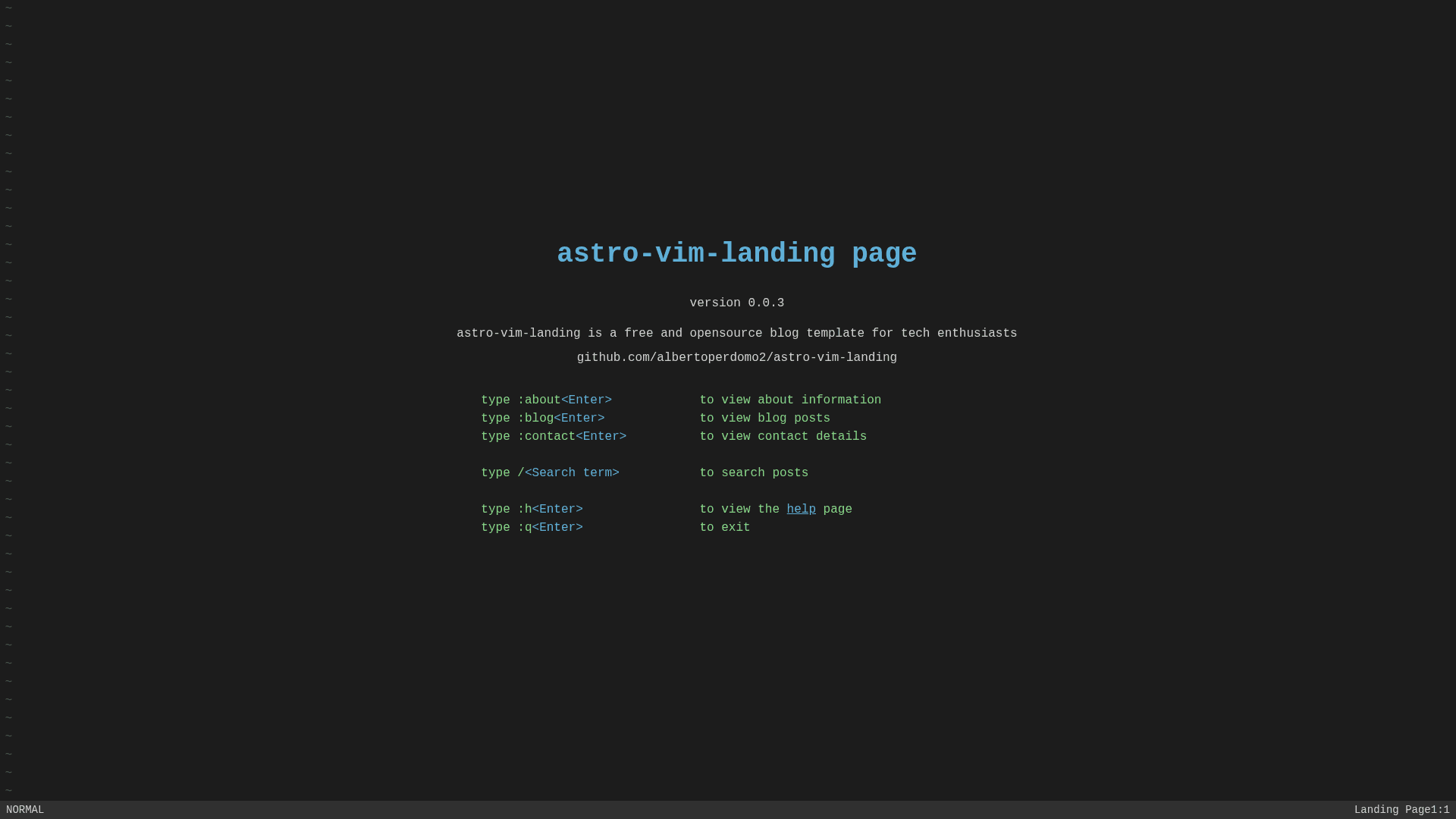
Astro landing page template that simulates a Vim console with working j/k/u key bindings for keyboard-driven navigation.
About this template
astro-vim is an Astro page template that recreates the look and behavior of the Vim text editor inside the browser, with working j, k, and u key bindings for keyboard-only navigation.
What is astro-vim?
astro-vim is a free, MIT-licensed Astro template by GitHub user albertoperdomo2 that simulates a Vim console for a personal landing page and blog. It takes Markdown files placed in the src/content directory as input and produces a static website with a sidebar, search bar, status bar, and individual blog post pages. The project runs on Astro with Tailwind CSS for styling and TypeScript for client-side scripting (key binding and search logic). It includes pages for home, about, blog, blog post slugs, contact, help, and an "exited" page, plus a JSON API endpoint that exposes blog posts.
Key Features
- Vim-style key bindings — Use j to move down, k to move up, and u to navigate up one level; the navigation logic is implemented in TypeScript in src/scripts/navigation.ts.
- Markdown content collections — Blog posts live as Markdown files in src/content/blog with frontmatter for title, date, author, and summary, validated by src/content/config.ts.
- Client-side search — A SearchBar component with search logic in src/scripts/search.ts filters content without a backend.
- Sidebar and status bar — A Sidebar component and a StatusBar component give the console-like layout; the README disclaimer confirms status bar rendering and commands work.
- JSON API endpoint — The page includes src/pages/api/blog-posts.json.ts, which returns blog posts as JSON for external consumption.
- Tailwind CSS styling — Global styles are configured in tailwind.config.cjs and src/styles/global.css.
- Project structure — Includes reusable Astro components (Footer, Header, KeyBindings, SearchBar, Sidebar, StatusBar), a Layout component, and a blog post dynamic route at src/pages/blog/[slug].astro.
- MIT License — The template is free to use and modify under the MIT License.
Who is it for?
- Vim enthusiasts — Get a personal site that feels like the editor they use daily, with j/k/u navigation that keeps hands on the keyboard.
- Developers building a personal blog or portfolio — Start from a ready-made Astro structure with blog, about, and contact pages, and add Markdown posts without wiring up a CMS.
- Keyboard-first users — Browse the site quickly using Vim-style bindings rather than clicking through the sidebar or scroll bar.
What can you do with astro-vim?
- Publish blog posts: Drop a Markdown file with frontmatter into src/content/blog, and the template generates a post page at /blog/slug.
- Expose posts as JSON: Use the blog-posts.json.ts API endpoint to feed your posts to an external app or build a headless setup.
- Customize the design: Edit tailwind.config.cjs and src/styles/global.css to change colors, fonts, and layout without touching the navigation logic.
How does astro-vim work?
- Clone the repository and run npm install to fetch dependencies.
- Run npm start to launch the Astro development server at http://localhost:3000.
- Create a new Markdown file in src/content/blog, then refresh to see the post appear in the blog list and search index.
Pros and cons
Pros:
- Open source under MIT, free to use and customize.
- Keyboard-driven navigation is implemented in TypeScript, not a plugin.
- Built on Astro, so the output is static and fast by default.
Cons:
- Only three key bindings (j, k, u) are documented; it is not a full Vim emulator.
- Requires Node.js to build and run the dev server.
Pricing
astro-vim is free: the repository is released under the MIT License, so there are no paid tiers or subscription plans to unlock.
FAQ
Is astro-vim free?
Yes. The template is published under the MIT License, so you can download, modify, and host it without paying anything.
How do I add a new blog post?
Add a Markdown file to the src/content/blog directory with title, date, author, and summary in the frontmatter. The template automatically generates a page at /blog/slug and includes it in the search index.
What tech stack does astro-vim use?
It uses Astro as the static site generator, Tailwind CSS for styling, and TypeScript for the client-side scripts that handle navigation and search. Content is stored as Markdown files.
Do the status bar and Vim commands actually work?
Yes. The README contains a disclaimer noting that status bar rendering is working (it previously was broken) and that the commands work as implemented.