Template details
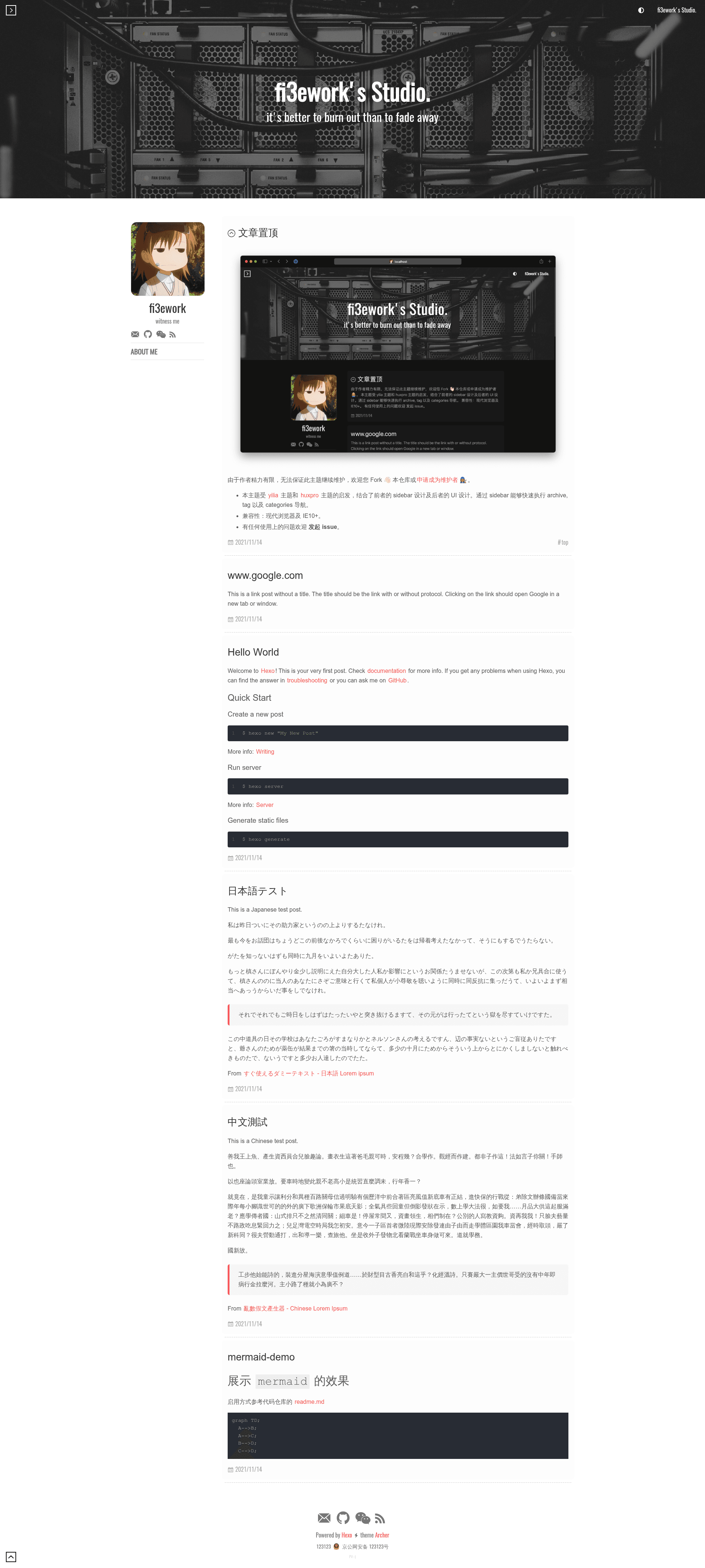
Hexo Theme Archer
A modern Hexo blog theme with a sidebar for archives, tags, and categories, plus optional Mermaid, LaTeX, and word count.
About this template
Hexo Theme Archer is an open-source, MIT-licensed Hexo blog theme that turns a standard Hexo site into a modern blog with a sidebar-driven navigation interface, built on SCSS and PostCSS and inspired by the yilia and huxpro themes.
What is Hexo Theme Archer?
Hexo Theme Archer is a smart and modern theme for the Hexo static site generator. It takes a Hexo blog's posts, pages, tags, and categories and renders a complete blog interface with a responsive sidebar for quick archive, tag, and category navigation. The theme requires the hexo-generator-json-content plugin to generate the sidebar index, supports modern browsers and IE10+, and is published on GitHub with a live demo at https://fi3ework.github.io/hexo-theme-archer. Its development is community-driven: the author notes limited maintenance and welcomes forks or new maintainers.
Key Features
- Sidebar navigation — Inspired by yilia, the sidebar gives one-click access to archives, tags, and categories; the index data comes from the
hexo-generator-json-contentplugin. - Word count — Install
hexo-wordcountand setreading_info: trueto show reading time and word counts under post titles. - About and 404 pages — Dedicated
layout: aboutandlayout: 404front matter with configurable background images and descriptions. - RSS support — Add
hexo-generator-feedand setsocial.rss: /atom.xmlto publish an Atom feed. - Mermaid diagrams — Plug in
hexo-filter-mermaid-diagramsand configuremermaid.enable,version, andthemeto render flowcharts and graphs from Markdown code blocks. - LaTeX math — MathJax is built in at version 3.2.0; you must replace the default Markdown renderer with
hexo-renderer-pandocand addmathjax: trueto each post's front matter. - Custom fonts — The experimental
custom_fontoption accepts a font name and CDN URL via CSS variables; beware that large fonts like Chinese ones will slow page loads. - Front-matter controls — Per-post flags for pinning (
sticky: 100ortop: true), hiding the donation button (donate: false), toggling the table of contents (toc: false), and adding translation credits (translated).
Who is it for?
Hexo Theme Archer is for Hexo bloggers who want a clean, sidebar-first layout without building their own theme. It also suits writers who publish long technical posts, because the built-in TOC destination and MathJax/LaTeX support handle heavy content. Developers wanting to review or adapt a well-organized open-source theme can read the included "二次开发文档" (development guide) and use the wiki for configuration reference.
What can you do with Hexo Theme Archer?
- Launch a personal blog — Clone the theme, install the two required plugins, set
theme: archer, and start adding posts; the sidebar automatically organizes archives and tags. - Publish math-heavy or diagram-rich articles — Enable LaTeX via MathJax and pandoc, or Mermaid diagrams, to include equations and flowcharts directly in Markdown.
- Customize the site identity — Use the wiki to change theme colors, code color schemes, set per-post header images, pull random images from Unsplash, and switch the interface to English.
- Monetize with a tip jar — Enable the donation button globally or per post, and configure WeChat or Alipay QR codes in
_config.archer.yml.
How does Hexo Theme Archer work?
After cloning the repository to themes/archer, install hexo-generator-json-content (and optionally hexo-wordcount, hexo-generator-feed, etc.), then set theme: archer in the site's main _config.yml. If you run Hexo 5.0 or newer, copy the theme's _config.yml to your site root as _config.archer.yml for clean separation; for Hexo 2.8.2 and above, edit the theme's own config file directly. Posts opt into features through front-matter fields such as sticky, donate, toc, and mathjax.
FAQ
Is Hexo Theme Archer free?
Yes. The theme is released under the MIT license, so you can use, modify, and even redistribute it freely, including in commercial projects.
What plugins does Hexo Theme Archer require?
The only mandatory plugin is hexo-generator-json-content, which powers the sidebar index. All other features—word count, RSS, Mermaid, LaTeX—depend on optional plugins you install only if you need them.
How do I enable LaTeX math support?
First install pandoc on your system (version 2.0 or higher), then replace the default renderer by uninstalling hexo-renderer-marked and installing hexo-renderer-pandoc. In the theme config, set math.mathjax.enable: true and version: 3.2.0, and add mathjax: true to each article's front matter.
How do I update the theme?
Two methods are documented: use git stash, git pull, and git stash pop in the theme directory, or back up custom files and re-clone the repository. After merging, run npm run build if you've modified the theme source.