Template details
Hyde-hyde
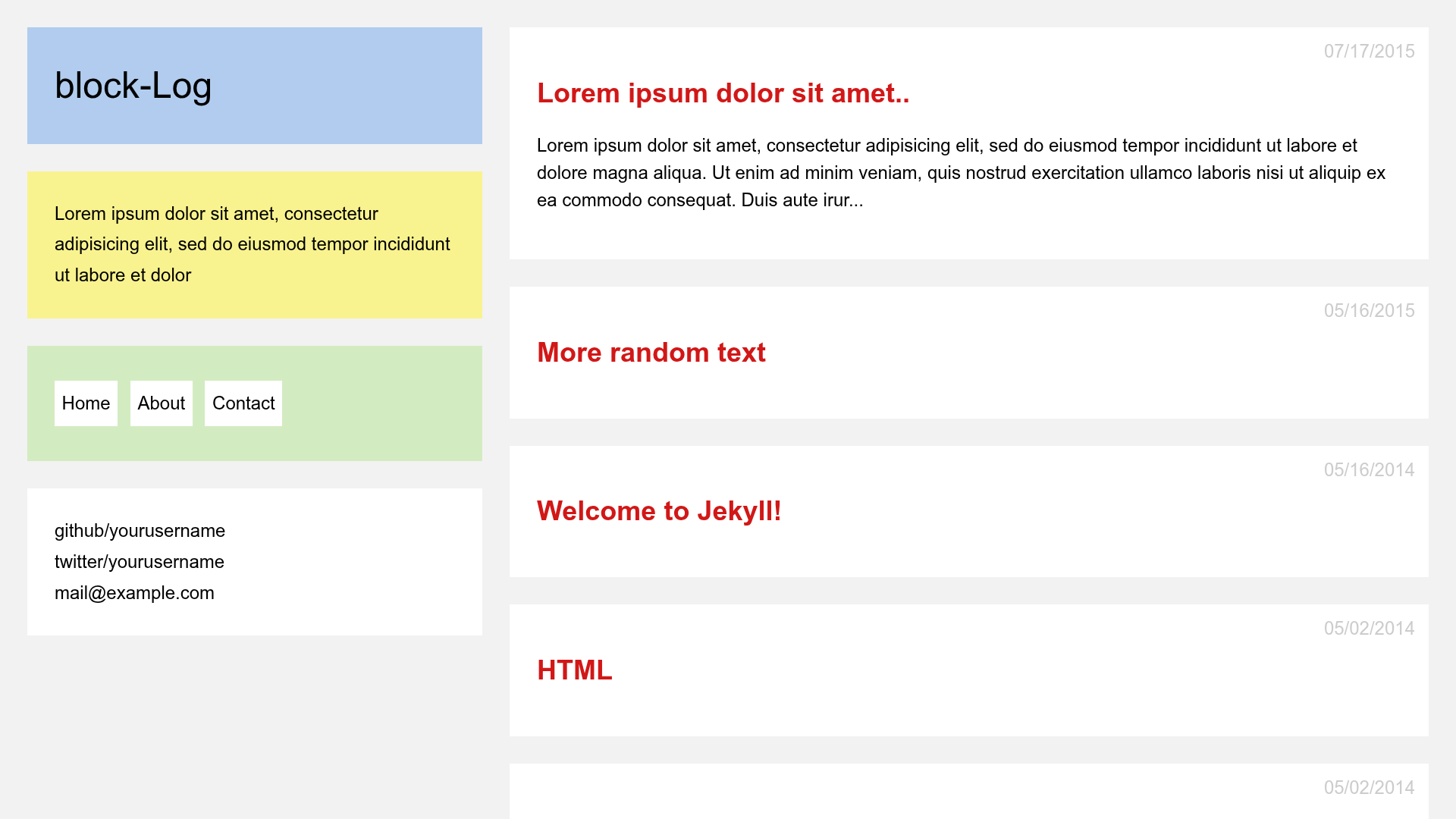
Hyde-hyde is a Hugo theme derived from spf13's Hyde, adding a portfolio page, table of contents, and multiple comment system options.
About this template
Hyde-hyde is a Hugo theme, derived from spf13's Hyde and Nate Finch's blog, that adds a portfolio layout, table-of-contents options, and pluggable comment systems to a classic two-column blog design.
What is Hyde-hyde?
Hyde-hyde is a Hugo theme for static blogging and portfolio sites, maintained by htr3n. It consumes Markdown content and front matter from a Hugo project and generates a full static website with a sidebar profile, post list, optional portfolio grid, and per-page sections. Since version 2.0, the theme styles were rewritten in modular SCSS compiled through Hugo's asset pipeline, so no external CSS build step is required.
Key Features
- SCSS-based theming — Styling is modularized under
assets/scss; the originalpoole.cssandhyde.cssare kept only for reference, so you can restyle the theme by editing SCSS partials. - Portfolio layout — A dedicated section renders project cards from Markdown files; each project can set
featured,screenshot,link, anddatein front matter, and the section is excluded from the main blog list. - Table of contents — Supports two TOC backends: Hugo's built-in
.TableOfContentslogic (referenced as the "hugo" mode) or Tocbot (the "tocbot" mode), toggled through thetocsite parameter; TOC can be disabled per page withinclude_toc = false. - Multiple comment systems — In addition to the built-in Disqus integration, you can switch to GraphComment, Utterances (which stores comments as GitHub issues), or Commento; self-hosted Commento instances are supported via
CommentoHost. - Code highlighting options — Built-in Hugo highlighting is the default, or you can enable highlight.js and choose a style; per-page
highlightjslanguagesfront matter lets you control which languages load. - Post navigation and related posts — Previous/Next post links appear by default and can be disabled with
postNavigation = false; related posts can be enabled withrelatedPosts = true. - System font stack — The theme uses system fonts instead of web fonts, which the README notes was done for privacy and performance; the mobile layout includes a collapsible menu.
Who is it for?
- Bloggers who want the classic Hyde sidebar design — They get a modernized Hugo port with optional TOC, related posts, and social icons.
- Freelancers and developers — They can showcase projects in a dedicated portfolio section with featured flags, screenshots, and external links, keeping projects separate from blog posts.
- Hugo users who care about comment-system flexibility — They can choose between Disqus, GraphComment, Utterances, or self-hosted Commento without changing the theme layout.
- Privacy-conscious site owners — The default system fonts avoid third-party font requests, and text-only code highlighting can be paired with a self-hosted comment system.
What can you do with Hyde-hyde?
- Personal bloggers: publish Markdown posts with an optional generated table of contents and receive reader comments through Disqus or another supported service.
- Developer portfolio owners: create a portfolio section with a project grid, mark one project as featured, and add screenshots and live links.
- Open-source maintainers: use Utterances to turn GitHub issues into a comments section, so posts and issues live in the same repository.
How does Hyde-hyde work?
Clone the theme into themes/hyde-hyde or add it as a git submodule, then set theme = "hyde-hyde" in your Hugo config file and run hugo. For portfolio pages, create a content/portfolio folder with an _index.md for the section title and one Markdown file per project, each using the layout: 'portfolio' front matter value so it appears only in the portfolio listing.
Pros and cons
- Open source — Released under the MIT license, so it can be freely reused and modified.
- Flexible integrations — More comment and code-highlighting options than the stock Hyde theme.
- Breaking changes in v2 — The README indicates version 2.0 was overhauled (SCSS refactor, layout restructure), so sites upgrading from earlier releases may need adjustments.
- Limited maintenance — The author notes they are seeking maintainers due to time constraints, which could affect future updates.
FAQ
Is Hyde-hyde free?
Yes. Hyde-hyde is an open-source Hugo theme released under the MIT license. You can use it for personal or commercial projects, modify it, and redistribute it as long as you preserve the license.
How do I enable the table of contents?
Set the toc parameter in your Hugo site configuration to "hugo" for Hugo's built-in TOC or "tocbot" for the Tocbot library. To turn TOC off entirely, remove the toc parameter. You can also disable TOC per page by setting include_toc = false in that page's front matter.
Can I disable the previous/next post navigation?
Yes. Add postNavigation = false to your site configuration. Related posts are also off by default and can be enabled separately with relatedPosts = true.
Which comment systems are supported?
The theme ships with Disqus support. You can replace it with GraphComment by setting GraphCommentId, use Utterances by setting UtterancesRepo (with optional UtterancesIssueTerm and UtterancesTheme), or use Commento by setting Commento = true and optionally CommentoHost for self-hosting.
Does Hyde-hyde work on mobile?
Yes. The layout is responsive, and in mobile mode the sidebar menu becomes collapsible, as documented in the README's screenshots.