Template details
Mere Blog Theme
Minimal Jekyll blog theme built with Bulma for GitHub Pages, featuring paginated posts, author profiles, dark mode, and Google Analytics.
About this template
Mere Blog Theme is a minimal, open-source Jekyll blog theme built on the Bulma CSS framework, designed for Jekyll sites hosted on GitHub Pages.
What is Mere Blog Theme?
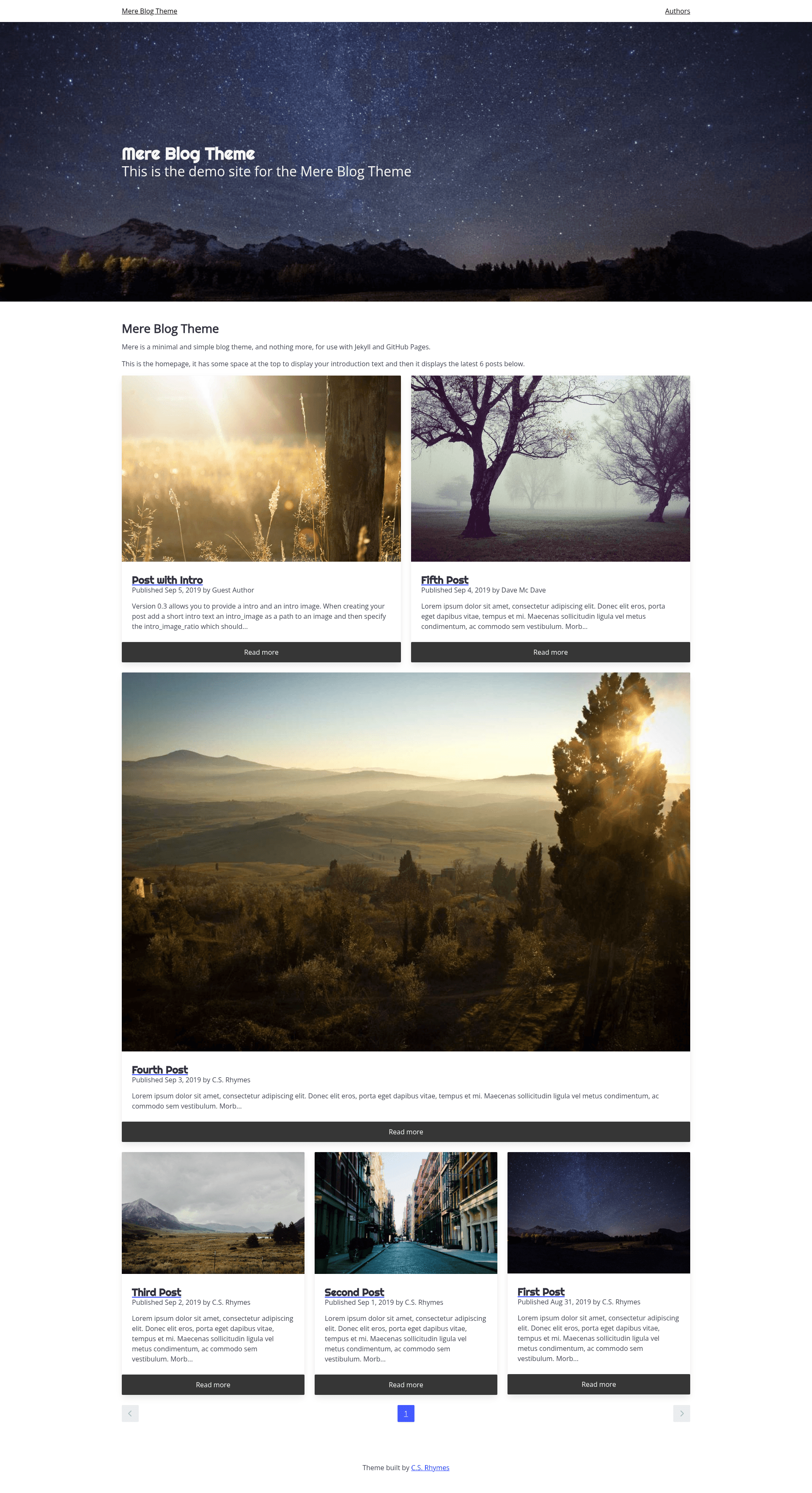
Mere Blog Theme is a Jekyll blog theme distributed as a Ruby gem and maintained by C.S. Rhymes on GitHub. It accepts standard Jekyll posts, collections, and configuration and produces a blog with a homepage listing the six most recent posts, paginated archive pages, author profiles, and optional Google Analytics. The theme uses Bulma v1 for styling and requires Jekyll 4.3 or newer, which means GitHub Pages users need a GitHub Actions workflow for the standard build.
Key Features
- Minimal Bulma design — The theme uses Bulma v1 and no JavaScript framework, keeping the front end lightweight and fast.
- Paginated homepage — The homepage displays a configurable number of posts per page (the default example is 6) via
paginateandpaginate_pathin_config.yml. - Post intro support — Front matter fields
intro,intro_image, andintro_image_ratiorender a bold opening paragraph and an optional image with Bulma aspect ratio classes such asis-16by9. - Authors collection — An
_authorsdirectory with Markdown files creates author pages that include a name, position, description, avatar, website, and social links for Facebook, Twitter, GitHub, GitLab, Instagram, LinkedIn, Medium, and Stack Overflow. Each author page lists their four latest posts. - Automatic dark mode — Bulma v1 follows the visitor's
prefers-color-schemesetting; setforce_themeto'light'or'dark'in_config.ymlto override. - Google Analytics — Add
google_analytics: UA-xxxxxxxxto_config.ymlto enable tracking. - MIT license — The theme is open source under the MIT License and accepts contributions via GitHub.
Who should use Mere Blog Theme?
Mere Blog Theme suits Jekyll users who want a straightforward, content-focused blog without a heavy JavaScript front end. Developers who are comfortable editing YAML front matter and Markdown can set up a blog quickly. Bloggers with multiple contributors can leverage the authors collection to display bios, avatars, and social profiles. Teams deploying to GitHub Pages who can use GitHub Actions for Jekyll 4.3 builds will find the theme easy to integrate.
What can you do with Mere Blog Theme?
- Launch a personal blog quickly — Install the gem, add
theme: mere-blog-themeto_config.yml, create anindex.htmlwith thehomepagelayout, and publish posts in_posts. - Publish posts with visual variety — Use front matter
intro,intro_image, andintro_image_ratioto add bold lead text and responsive images to individual posts. - Build a multi-author site — Create an
_authorscollection and anauthors.mdpage to generate author profiles with social links, a navbar link, and a list of each author's recent posts. - Match reader preferences — Rely on Bulma's automatic dark mode or force a single theme with the
force_themeoption.
How does Mere Blog Theme work?
Add gem "mere-blog-theme" to your Gemfile and set theme: mere-blog-theme in _config.yml, then run bundle install. Posts are written as standard Jekyll Markdown files with front matter; the homepage uses the homepage layout. For authors, configure an _authors collection with output: true and create an authors.md page with the authors layout. Run bundle exec jekyll serve to test locally.
FAQ
Does Mere Blog Theme work with GitHub Pages?
Version 1 of Mere Blog Theme requires Jekyll 4.3, while GitHub Pages' standard build uses Jekyll 3.9. To use this theme on GitHub Pages, you need to build and deploy your site using a GitHub Actions workflow, as described in the Jekyll documentation for continuous integration.
How do I add a new author?
Create an _authors directory and add a Markdown file for each author. In the front matter, set layout: author, name (matching the name used in posts), position, description, and optionally avatar, website, and social profile URLs. Then create an authors.md page with layout: authors and add the collection to _config.yml with output: true.
How do I enable dark mode?
The theme uses Bulma v1's automatic dark mode, which follows the visitor's system preference through prefers-color-scheme. To force a theme, set force_theme: 'light' or force_theme: 'dark' in _config.yml.
Can I disable pagination?
Yes. Pagination is controlled by the paginate and paginate_path settings in _config.yml. If you omit paginate, no pagination occurs, though the homepage layout is designed with pagination in mind.
Is Mere Blog Theme free?
Yes, it is released under the MIT License, so you can use it for personal or commercial projects at no cost. The source is available at https://github.com/chrisrhymes/mere-blog-theme.