Template details
Spring
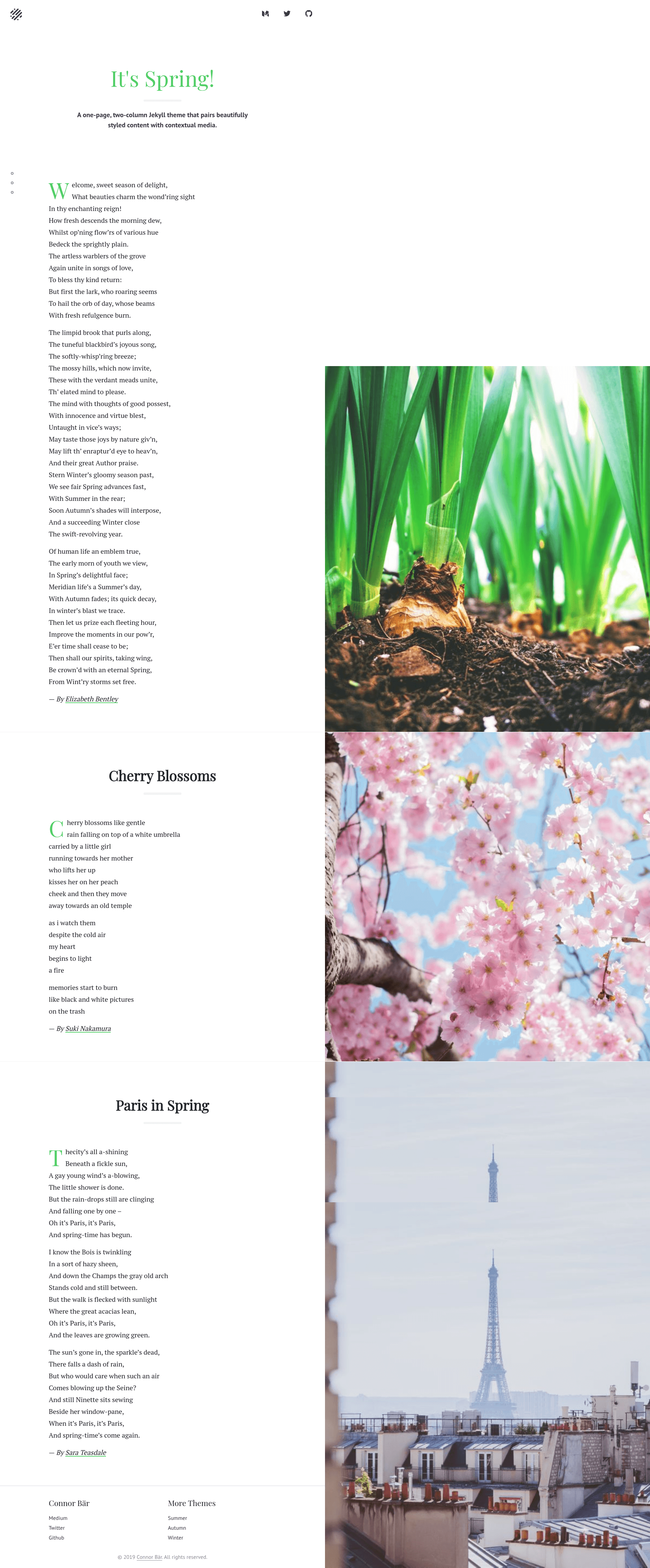
A one-page, two-column Jekyll theme that pairs beautifully styled content with contextual media.
About this template
Spring is a one-page, two-column Jekyll theme for publishing long-form content alongside contextual media, built by Connor Baer and released under the MIT license.
What is Spring?
Spring is an open-source Jekyll theme that arranges text and media in a single-page, two-column layout. It takes a standard Jekyll site (posts, pages, and configuration) and generates a static website with one page that pairs written content with images or other media. The theme is created by Connor Baer and is available on GitHub. It ships with a fully furnished Jekyll setup, including a Gemfile and package.json, so you can clone the repository and start a local server with a few commands. The theme is no longer actively maintained but is noted to work as-is.
Key Features
- Two-column one-page layout — Content is presented in a single scrollable page with two columns, one for main text and one for contextual media, tailored for long-form reading.
- Dark theme option — The theme includes a built-in dark color scheme that you can enable or disable through options in the _config.yml file.
- Furnished Jekyll setup — The repository includes all necessary Ruby gem and Node module dependencies, defined in the Gemfile and package.json, so setup is just bundle install and yarn.
- Local server script — Running yarn start launches the Jekyll server on port 4000, giving you immediate local preview of the site.
- Configurable options — Several theme behaviors are adjustable through _config.yml, allowing you to customize the site without editing template files.
- MIT licensed — The theme is free to use, modify, and redistribute; contributions are welcome via pull requests and issues.
Who is it for?
Spring suits writers and bloggers who want a minimal, clean presentation for long-form articles with accompanying imagery. Developers starting a new Jekyll project can use it as a ready-made base instead of configuring a theme from scratch. Photographers and designers can also use the two-column layout to pair visual portfolios with descriptive text.
What can you do with Spring?
- Bloggers: Publish long-form essays in a single-page layout, with photos or illustrations displayed in the second column as readers scroll.
- Portfolio owners: Showcase projects by placing images in the media column and project narratives in the text column.
- Documentation writers: Present technical guides with diagrams or screenshots alongside step-by-step instructions.
How does Spring work?
Spring runs as a standard Jekyll site. After installing Jekyll, the bundler gem, and yarn (or npm), clone the repository and run bundle install followed by yarn to install dependencies. Start the development server by running yarn start, which serves the site at localhost:4000. To customize the theme, edit options in _config.yml and rebuild the site.
Pros and cons
- Pros: Free under the MIT license; includes a dark mode; provides a complete starter setup with dependencies included; simple command to start a local server.
- Cons: The theme is no longer actively maintained, so it may not receive updates for newer versions of Jekyll or security fixes.
Pricing
Spring is entirely free and open source under the MIT license. There are no paid tiers or subscription fees.
Alternatives
Minima is the default Jekyll theme that ships with new Jekyll site generations, offering a simpler single-column layout compared to Spring's two-column design.
FAQ
Is Spring free?
Yes, Spring is open source and distributed under the MIT license, so it is free to use for personal or commercial projects without licensing fees.
Does Spring have a dark mode?
Yes, Spring includes a dark theme option that can be enabled by changing the relevant setting in the _config.yml file. The README highlights it as a standout feature.
Is Spring still maintained?
The theme is no longer actively maintained, but the README states it should work as-is. The author welcomes contributions via pull requests and bug reports.
What are the requirements to run Spring?
You need Jekyll, the bundler gem, and yarn (or npm) installed on your computer. After cloning the repository, run bundle install and yarn to install dependencies, then yarn start to launch the server.