Template details
Monolume
Bold, minimalist portfolio template built with Astro, TypeScript, and Tailwind CSS for developers, designers, and freelancers.
About this template
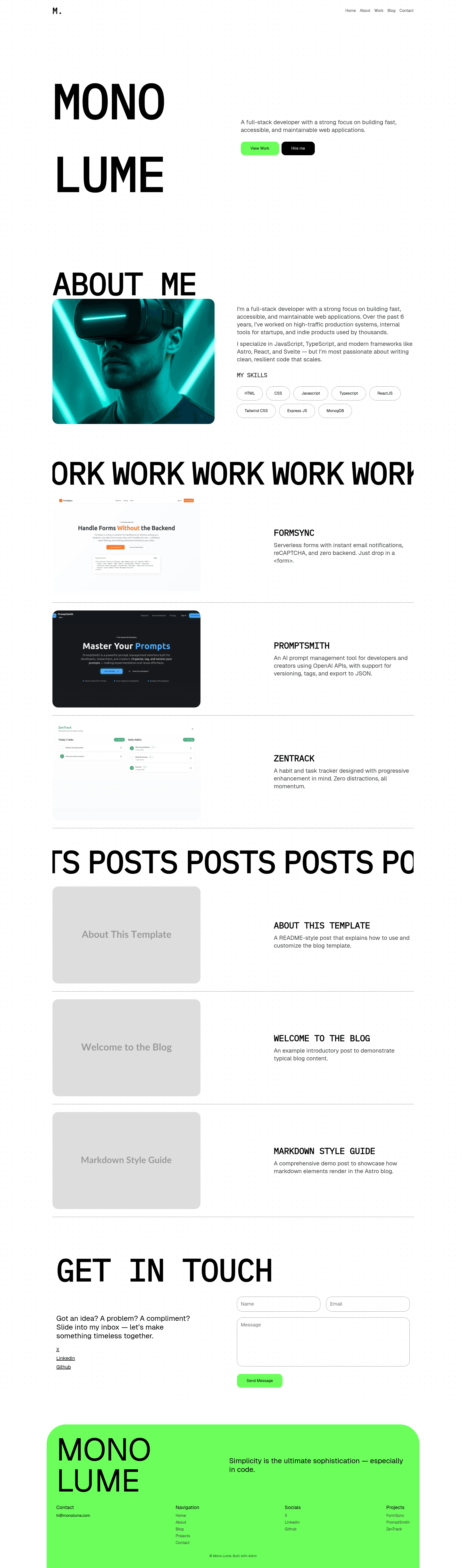
Monolume is a bold, minimalist portfolio theme built with Astro for developers, designers, and freelancers to showcase projects and write blog posts.
What is Monolume?
Monolume is a static portfolio template built on Astro, TypeScript, and Tailwind CSS. It takes Markdown content from src/content/blog and src/content/projects and renders a multi-page site with home, about, projects, blog, and contact pages, plus a 404 page. The template is distributed as an open-source Astro project that runs with the pnpm package manager and is listed on themes.mhsh.in.
Key Features
- Minimal, bold typography — Brutalist-inspired headline treatment paired with clean spacing, giving the site a developer-focused editorial look.
- Projects showcase layout — A projects index at src/pages/projects/index.astro and detail pages at src/pages/projects/[...id].astro render entries from src/content/projects through the Projects.astro and Card.astro components.
- Blog support — Blog index and dynamic post pages at src/pages/blog/[...id].astro read Markdown from src/content/blog, using FormattedDate.astro for consistent date display.
- Contact form — The Contact.astro component provides a contact form section on the contact page, with a corresponding route in the page tree.
- Responsive design — Tailwind CSS utilities make the layout adapt to mobile, tablet, and desktop viewports.
- SEO-friendly — The Head.astro component centralizes meta-title and description handling, and Astro generates static HTML for fast indexing.
- TypeScript & content schemas — content.config.ts defines type-safe schemas for blog posts and projects, and the codebase is written in TypeScript.
Who is it for?
- Freelance developers — Set up a professional portfolio with project case studies and a blog in an afternoon, with no CMS required.
- Designers — Present visual work on a clean, bold canvas that emphasizes typography and whitespace.
- Technical writers — Publish Markdown-based blog posts with automatic date formatting and per-page SEO metadata.
What can you do with Monolume?
- Indie developers: Swap the sample content in src/content with your own projects and posts, then run pnpm build to generate a deployable static site.
- Agencies: Display client work on the projects grid and link out to individual case-study pages for deeper detail.
- Open-source maintainers: Combine a project showcase with release notes or changelog-style blog posts on one self-hosted site.
How does Monolume work?
The workflow is command-line based. After cloning the repository, run pnpm install to fetch dependencies, pnpm dev to start a local server at localhost:4321, and pnpm build to output a production-ready static site to ./dist/. Content is edited directly in the src/content/blog and src/content/projects folders as Markdown files, and the site regenerates on build.
FAQ
What Astro version does Monolume use?
The template is built with Astro as the static site generator, with TypeScript for type safety and Tailwind CSS for styling. The project includes astro.config.mjs and follows the standard Astro project structure.
Can I add new pages to Monolume?
Yes — new pages can be added under src/pages, following the existing pattern of .astro files. The template includes index.astro, about.astro, contact.astro, and 404.astro, plus dynamic route folders for blog and projects.
Does Monolume include a contact form backend?
The template ships Contact.astro with the form markup on the contact page, but no backend or form-handling service is specified in the documentation. You would wire the form to your own endpoint or service.
What package manager should I use?
The documented commands use pnpm, though Astro projects generally work with npm or yarn as well. The template's package.json includes the standard Astro scripts for dev, build, and preview.