Template details
Nuxt Content Blog
Create blog posts from the command line and get them up and running automatically with this Nuxt starter template.
About this template
Nuxt Content Blog is a Nuxt.js starter template and CLI scaffold that creates a blog powered by the @nuxt/content module, with commands for writing posts from the terminal and automatically starting your dev server.
What is Nuxt Content Blog?
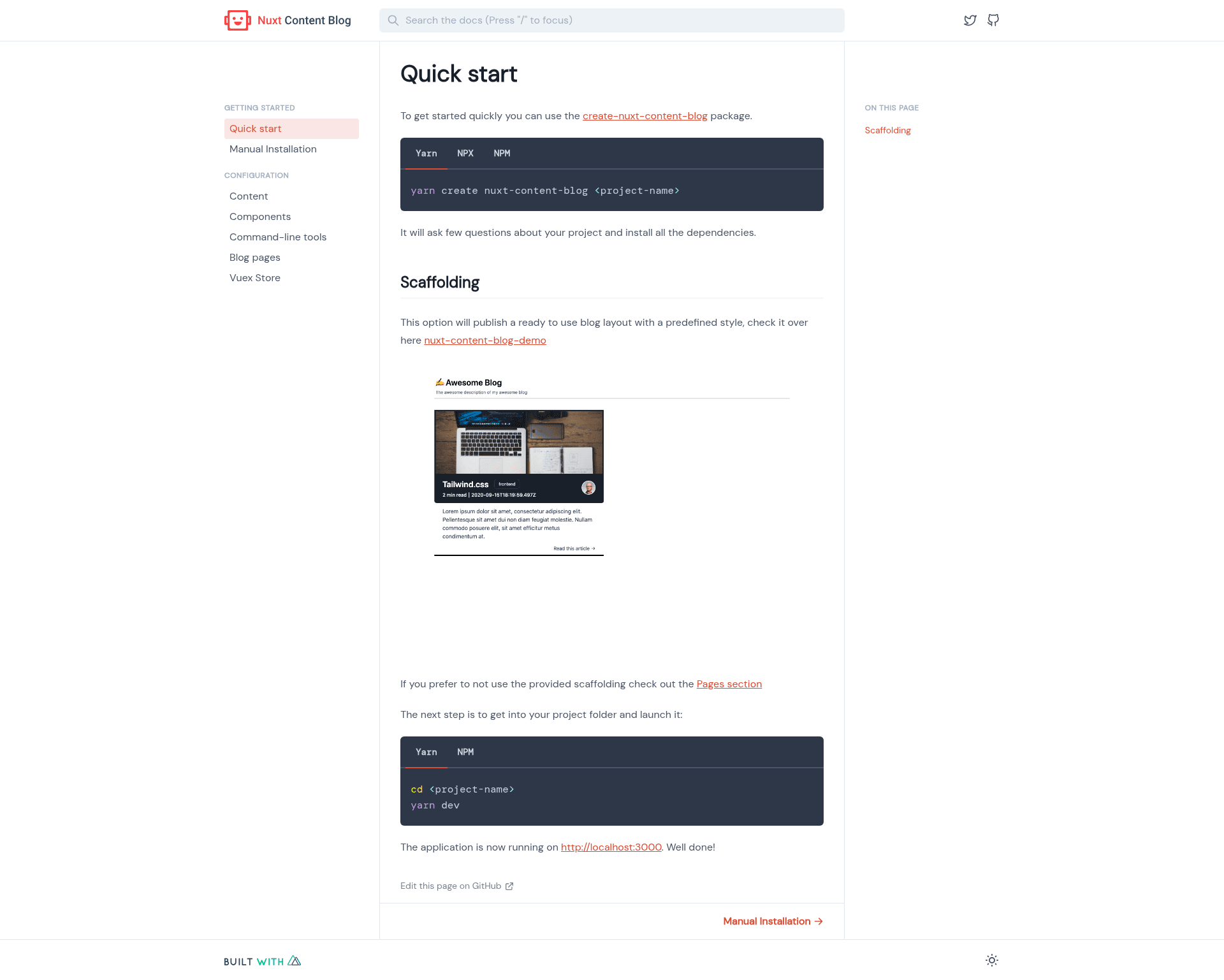
Nuxt Content Blog is an open-source package published under the @64robots organization. It provides a project generator that you run with yarn create nuxt-content-blog or npx create-nuxt-content-blog, passing a project name as the argument. The generator scaffolds a complete Nuxt blog pre-configured with the @nuxt/content module, which lets you write posts in Markdown and have them rendered as a blog. It runs on Node.js and relies on yarn or npx to fetch and execute the generator.
Key Features
- One-command setup — Run
yarn create nuxt-content-blog my-blogornpx create-nuxt-content-blog my-blogto generate a new project in seconds. - CLI-based post creation — The repository description notes you can "create blog posts from the command line," meaning the generated project includes tooling to author new posts without leaving the terminal.
- Automatic startup — After scaffolding, the project is "up and running automatically," so the dev server starts without separate manual steps.
- Powered by @nuxt/content — The blog uses Nuxt's content module to manage Markdown files, so posts are stored as files in your project and rendered by Nuxt.
- MIT licensed — The template is open source and freely usable, with an MIT license file included in the repository.
- Documentation site — A separate documentation site is available at nuxt-content-blog.netlify.app.
Who is it for?
- Nuxt developers — Anyone already familiar with Nuxt who wants a pre-built blog structure with content handling instead of wiring up @nuxt/content themselves.
- Technical bloggers — Writers who prefer Markdown and the command line for publishing posts, and want a minimal setup that runs locally.
- Hobbyists and indie devs — People who want a personal blog up quickly without purchasing a blogging platform or designing a site from scratch.
What can you do with Nuxt Content Blog?
- Start a new blog in seconds — Generate a working Nuxt blog project with a single NPM or Yarn command, then add your own Markdown posts.
- Create posts from the terminal — Use the included command-line workflow to author blog content, and rely on the automatic startup to see changes live.
- Run a documentation-style site — Because it's built on @nuxt/content, the same project can serve documentation pages written in Markdown, fitting the "Documentation" tag seen in the package metadata.
How does Nuxt Content Blog work?
Using the template is a two-step process: you run either yarn create nuxt-content-blog <project-name> or npx create-nuxt-content-blog <project-name> in your terminal. The command fetches the generator package, asks for a project name, then scaffolds a full Nuxt application configured with @nuxt/content. After that, the project's own CLI lets you create posts and starts the dev server automatically.
Pricing
Nuxt Content Blog is free. It is released under the MIT License, so there is no licensing fee and you are free to modify and reuse the generated blog.
FAQ
How do I start a new blog with Nuxt Content Blog?
Run yarn create nuxt-content-blog my-blog or npx create nuxt-content-blog my-blog in your terminal. Replace my-blog with your chosen project name. The command downloads the generator and scaffolds a complete Nuxt blog in your current directory.
Is Nuxt Content Blog free?
Yes. The template is open source under the MIT License, which means it is free to use, modify, and distribute. You do not need to pay anything to generate a blog or use the generated code commercially.
What framework does Nuxt Content Blog use?
It uses Nuxt.js, a Vue-based framework, and the @nuxt/content module. Blog posts are written as Markdown files and rendered by Nuxt's content engine into a working blog site.
Can I create posts without using a browser?
Yes. The project is designed for command-line post creation. The repository description states you can "create blog posts from the command line and get them up and running automatically," so you can author and preview posts entirely from the terminal.