Template details
Nuxt Docs Template
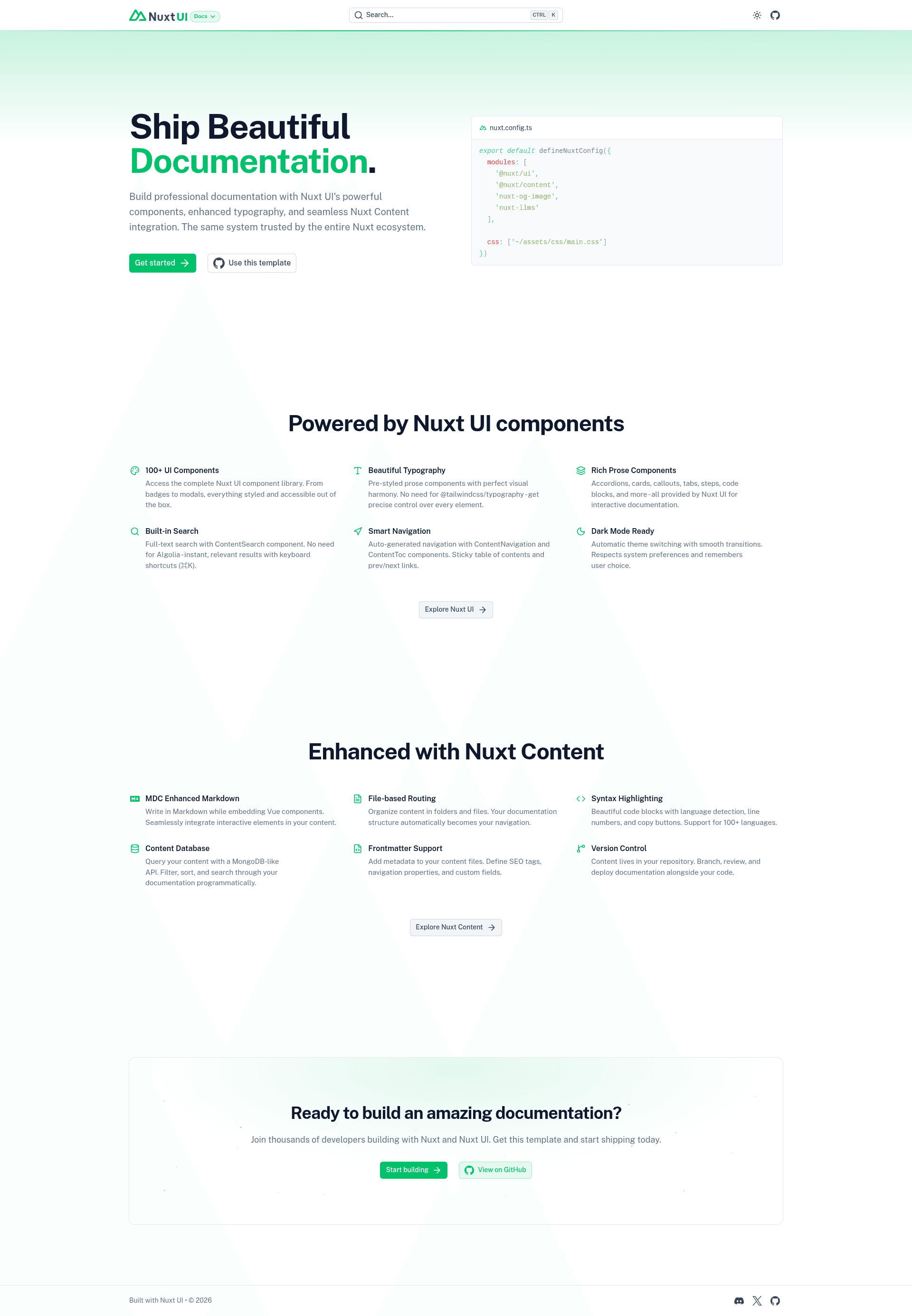
A documentation template made with Nuxt UI and Nuxt Content.
About this template
Nuxt Docs Template is a starter template for building documentation websites with Nuxt UI and Nuxt Content, provided by the Nuxt UI team.
What is the Nuxt Docs Template?
The Nuxt Docs Template is a pre-configured starter that scaffolds a documentation site running on Nuxt, the Vue-based web framework. It uses Nuxt UI as its component library and Nuxt Content to turn Markdown files into pages. The result is a functional docs site with navigation, typography, and a live demo at https://docs-template.nuxt.dev/. The template is maintained in the nuxt-ui-templates GitHub organization and can be used for both personal and commercial projects.
Key Features
- One-command scaffolding — Create a new project with
npm create nuxt@latest -- -t ui/docs, which pulls the template and installs it with your chosen package manager. - Nuxt UI components — The template comes with Nuxt UI's Vue component set, giving you buttons, badges, navigation, and more out of the box.
- Nuxt Content integration — Documentation pages are written as Markdown files; Nuxt Content parses them and generates routes automatically.
- Local development workflow — Run
pnpm install, thenpnpm devto start a development server at http://localhost:3000 with live reload. - Production build — Use
pnpm buildto generate a production-ready static site or server-rendered app;pnpm previewlets you check the build locally. - Deploy with Vercel — A dedicated "Deploy with Vercel" button clones the repository and sets up a Vercel project with a demo URL and title, so deployment takes one click.
- Renovate dependency updates — The README recommends installing the Renovate GitHub app to keep dependencies current automatically.
- Live demo and documentation — The template's demo and its configuration docs at https://ui.nuxt.com/docs/getting-started/installation/nuxt show how to customize it further.
Who is it for?
- Open-source maintainers — Publish project documentation without writing HTML, CSS, or infrastructure code; just edit Markdown files.
- Vue and Nuxt developers — Need a docs site that matches their stack and can be extended with Nuxt UI's components.
- Product teams — Ship a clean, accessible documentation hub fast, with built-in navigation and a design system from Nuxt UI.
What can you do with it?
- Create a docs site from scratch: Run the quick start command, fill the content directory with Markdown, and publish to any static host.
- Deploy to production: Use the Vercel deploy button to get a live URL immediately, or follow the Nuxt deployment documentation for other platforms.
- Customize the design: Modify the Nuxt UI theme, add components, and restructure the layout to match your brand.
How does the template work?
The template uses Nuxt Content as its engine: you author Markdown files in the content folder, and Nuxt Content generates pages at build time. For development, pnpm dev launches the local server with live reload; for production, pnpm build creates an optimized output. The template also supports Renovate, which watches the repository and opens pull requests automatically when dependencies have updates.
FAQ
How do I start a new project from this template?
Run this command in your terminal: npm create nuxt@latest -- -t ui/docs. This scaffolds the template with Nuxt's create command using npm.
What is the tech stack of this template?
The template is built on Nuxt, with Nuxt UI for the interface and Nuxt Content for Markdown-based content. It is written in Vue and follows Nuxt's conventions for routing and modules.
Can I deploy to Vercel?
Yes. The template includes a "Deploy with Vercel" button that creates a new repository and Vercel project with a pre-filled demo name and URL. You can also deploy manually using the Nuxt deployment guide.
Is this template free to use?
The template is a free starter and its source is available in the nuxt-ui-templates GitHub repository. No paid plan is mentioned on the README; you do need a hosting account to publish the site.
How do I run the project locally?
After scaffolding, run pnpm install to install dependencies, then pnpm dev to start the development server at http://localhost:3000. For production, use pnpm build and pnpm preview.