Template details
Photo_Wall
A love story photo wall website template built with HTML, CSS, and JavaScript that you can customize and deploy in under 10 minutes.
About this template
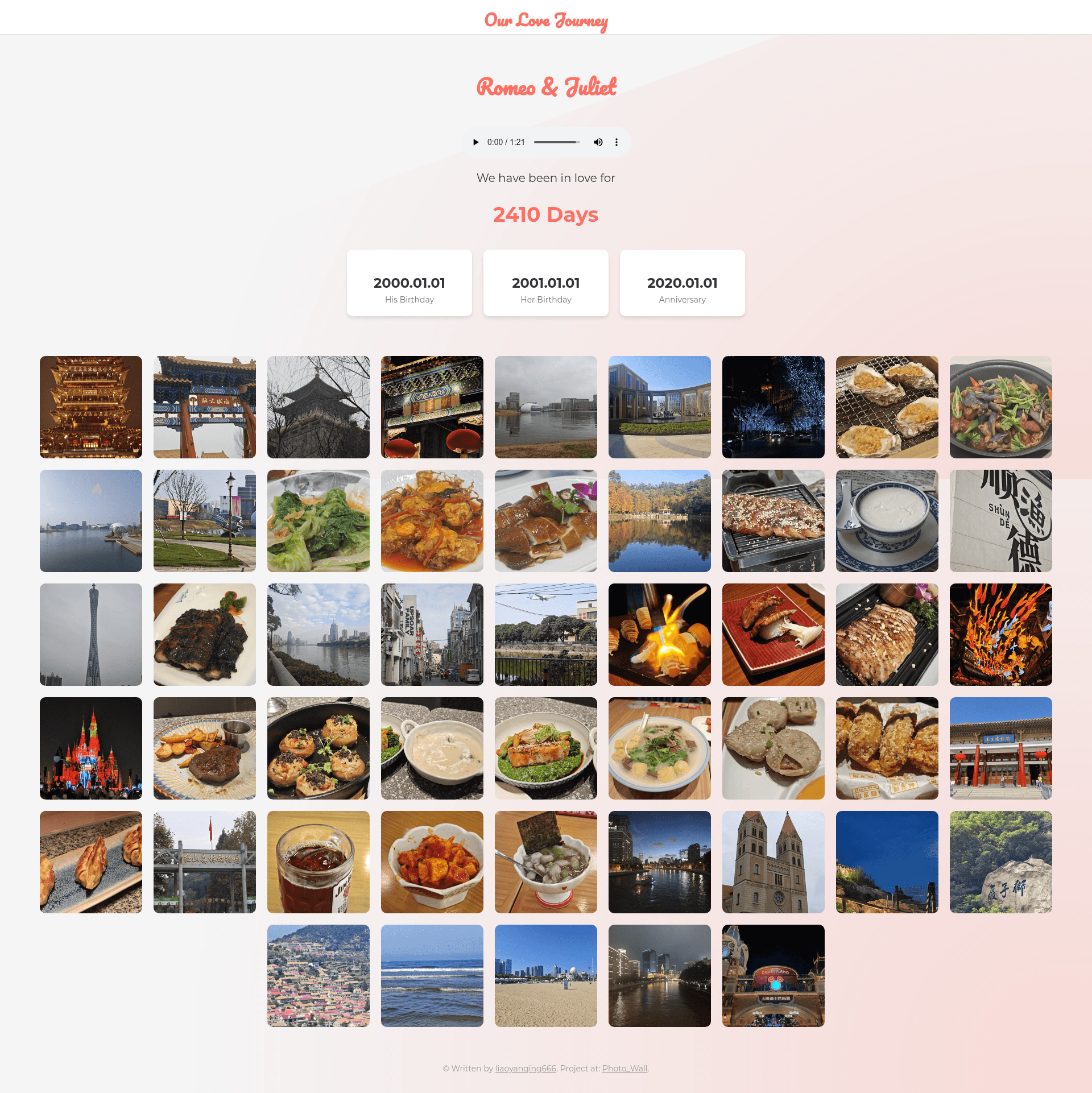
Photo_Wall is a self-hosted love photo wall website template built with vanilla HTML, CSS, and JavaScript, designed to turn a couple's photos into a romantic, deployable gift website in fewer than 10 minutes.
What is Photo_Wall?
Photo_Wall takes a folder of photos plus a few editable fields for names, birthdays, and anniversary dates, and produces a responsive photo gallery website that includes a heart cursor trail, EXIF-based image ordering, and an automatic love-days counter. The template is published as an open-source GitHub repository and a live demo is hosted at siyuanli.tech/Photo_Wall. It is a static site, so you can deploy it to GitHub Pages or any static hosting service without a server or database.
Key Features
- Heart trail and floating hearts — a mouse-move heart trail and a faint floating heart at the bottom of the screen create a romantic atmosphere; you can disable the effect by deleting the
<script src="hearts.js"></script>line in index.html. - Click-to-view large images — clicking any thumbnail opens a larger version and shows the shooting time when EXIF data is available; close it via the Esc key or the X button.
- Arrow and keyboard navigation — switch between photos using the on-screen left/right arrows or the arrow keys on your keyboard.
- Reverse-chronological ordering — the included Python script step1_rename.py reads each photo’s EXIF shooting time, renames files by date, converts other image formats to JPG, and step2_thumbnail.py generates thumbnails so the newest photos appear first.
- Batch and scroll loading — photos load in batches of 10, the first 5 batches load on startup, and the next batch loads automatically when scrolling within 1000px of the page bottom; all of these numbers are configurable in script.js.
- Automatic love-days counter — after you set the love date in script.js, the site calculates and displays the number of days you’ve been together.
- Responsive mobile support — the layout adapts to phone and desktop screens, so you can browse the gallery on a mobile device.
Who is it for?
- Couples — customize the names, birthday, and love date fields in index.html and script.js to create a private anniversary, Valentine’s Day, or birthday gift website for your partner.
- Beginners with basic GitHub skills — the README’s five-step fork-and-deploy workflow uses only the GitHub web interface, so you don’t need a local development environment or command line.
- Developers wanting a simple photo-gallery starter — the template uses plain HTML, CSS, and JavaScript with no build step, making it easy to fork, modify, or embed into another project.
What can you do with Photo_Wall?
- Anniversary gifts: set the anniversary date and upload year-by-year photos to build a countdown-style love page that automatically shows your days together.
- Birthday presents: edit the birthday field in index.html to make a photo wall for a partner, spouse, or family member.
- Public love stories: deploy to GitHub Pages and share the URL so friends and family can browse your photo timeline on any device.
- Photo viewing on the go: use the responsive mobile layout to show the gallery on your phone when you’re with your partner.
How does Photo_Wall work?
The workflow has five steps: fork and clone the repository (or download the zip), delete the bundled images folder, add your own photos, replace the name/birthday/love date placeholders in index.html and script.js, run step1_rename.py then step2_thumbnail.py, and finally enable GitHub Pages on the main branch in the repository Settings. The two Python scripts handle EXIF-based renaming, JPG conversion, and thumbnail generation so the final site loads efficiently.
FAQ
Is Photo_Wall free to use?
Yes. The repository is open source, so you can freely fork it, modify it, and host your own version. There are no license fees, subscriptions, or watermarks associated with the template itself.
What image formats are supported?
Most photo formats are accepted, and the step1_rename.py preprocessing script converts every image to JPG before the site is built. If a photo has no EXIF data, the script falls back to sorting by file name.
Can I remove the heart trail effect?
Yes. Delete the line <script src="hearts.js"></script> from index.html and the mouse-move heart trail and floating heart will no longer appear on your site.
Can I change how many photos load at once?
Yes. The batch size (default 10), initial number of batches (default 5), and scroll trigger distance (default 1000px) are all defined in script.js, so you can adjust them to match your photo count and network speed.