Template details
Simply Cyan
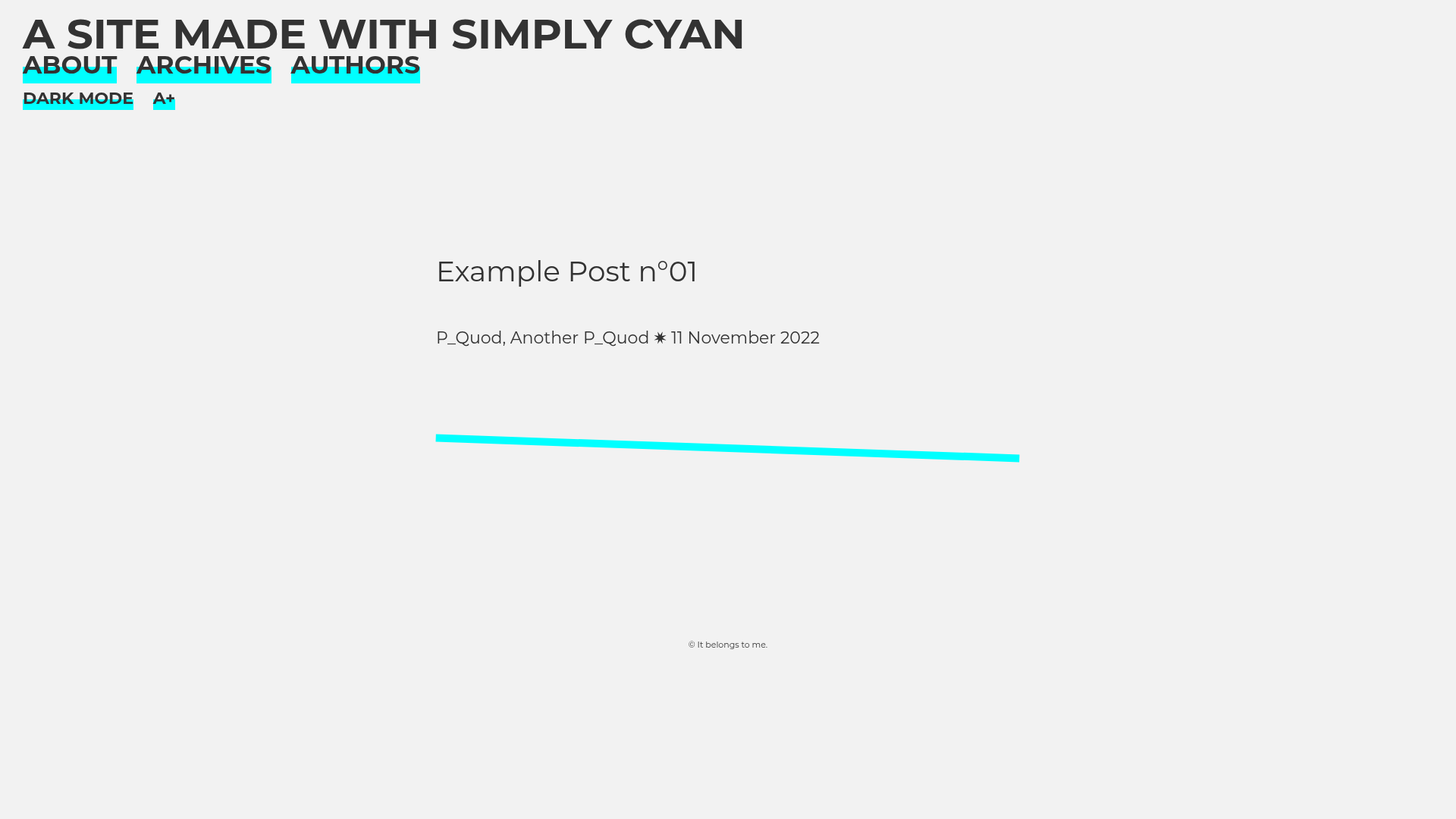
A Jekyll theme dedicated to text and reading, offering dark/light mode, adjustable font size, and serif/sans-serif toggles for better readability.
About this template
Simply Cyan is a free, open-source Jekyll theme designed for text-first websites, with built-in controls for dark mode, font size, and font style to make long-form reading comfortable.
What is Simply Cyan?
Simply Cyan is a Jekyll theme distributed as a Ruby gem that transforms a standard Jekyll site into a reading-focused blog or publication. It takes content from Jekyll's _posts folder and renders it as a static site, with an authors page, an archives page, and a homepage that lists the ten newest posts. The theme is maintained by the project's contributors on GitHub and released under the MIT License.
Key Features
- Dark/light mode toggle — Visitors can switch between dark and white themes with a single click; the active mode is controlled via configurable colors in
_sass/_settings.scss. - Adjustable font size — A reading function enlarges text for easier reading, useful for long articles or readers with visual preferences.
- Font style switching — Users can toggle between serif and sans-serif font families, a feature often used to improve readability for dyslexic readers.
- Multi-author support — Each author gets a profile page created by adding a file in the
_categoriesfolder, and posts can list multiple authors in their front matter. - Archives page — A dedicated page displays every post published on the site, in addition to the homepage's default listing of the ten most recent posts.
- Customizable settings — Site title, description, navigation links, and visibility of reading functions are managed through the
_config.ymlfile; deeper styling changes are made via SCSS variables in_settings.scss. - GitHub Pages compatible — The theme works on Jekyll-powered static hosting, including GitHub Pages, as demonstrated by its live demo.
- Open source — The theme is free under the MIT License, and bug reports and pull requests are welcome on its GitHub repository.
Who is it for?
- Bloggers and writers — Publish articles in a clean, readable layout with minimal visual distraction, focusing attention on the text.
- Multi-author publications — Manage a team of contributors with dedicated author profile pages and posts that support multiple authors.
- Dyslexic readers and accessibility advocates — The font style toggle between serif and sans-serif helps customize reading comfort, and the larger font option supports readability.
What can you do with it?
- Publish a personal blog — Set up a Jekyll site, add posts in
_posts, and the theme handles listing, archiving, and reading controls automatically. - Create a multi-author magazine or journal — Register authors in
_categories, include author names in post front matter, and the site aggregates posts and profiles. - Host documentation or text-heavy reference sites — With customization via
config.ymlandsettings.scss, you can adapt the theme beyond blogging, though it's optimized for prose.
How does it work?
Installation follows the standard Jekyll theme workflow. Add gem "simply-cyan" to your Gemfile, run bundle install, set theme: simply-cyan in _config.yml, then run bundle exec jekyll serve to build the site locally. To add content, create posts in the _posts folder with the required front matter, and create author files in _categories to enable the authors page.
FAQ
Is Simply Cyan free?
Yes, the theme is released under the MIT License, meaning it is free to use, modify, and distribute, with attribution. There are no paid tiers or premium features.
How do I change the colors of the theme?
Colors for both dark and light modes, along with fonts, line height, and font sizes, are defined as SCSS variables in the _sass/_settings.scss file. Edit those variables and the site rebuilds with the new values.
How do I display multiple authors on a post?
In the post's front matter, list authors under the author key as a YAML array, for example author: ["Someone", "Someone else"]. For each author to appear on the authors page, create a matching file in the _categories folder.
Does Simply Cyan work with GitHub Pages?
Yes, the theme is Jekyll-based and the demo site is hosted on GitHub Pages, which automatically builds Jekyll sites. After adding the theme to your Gemfile and config, GitHub Pages will build your site from the repository.
How many posts does the homepage show?
By default, the homepage displays the ten newest posts. You can change this number in the _config.yml file.