Template details
Up
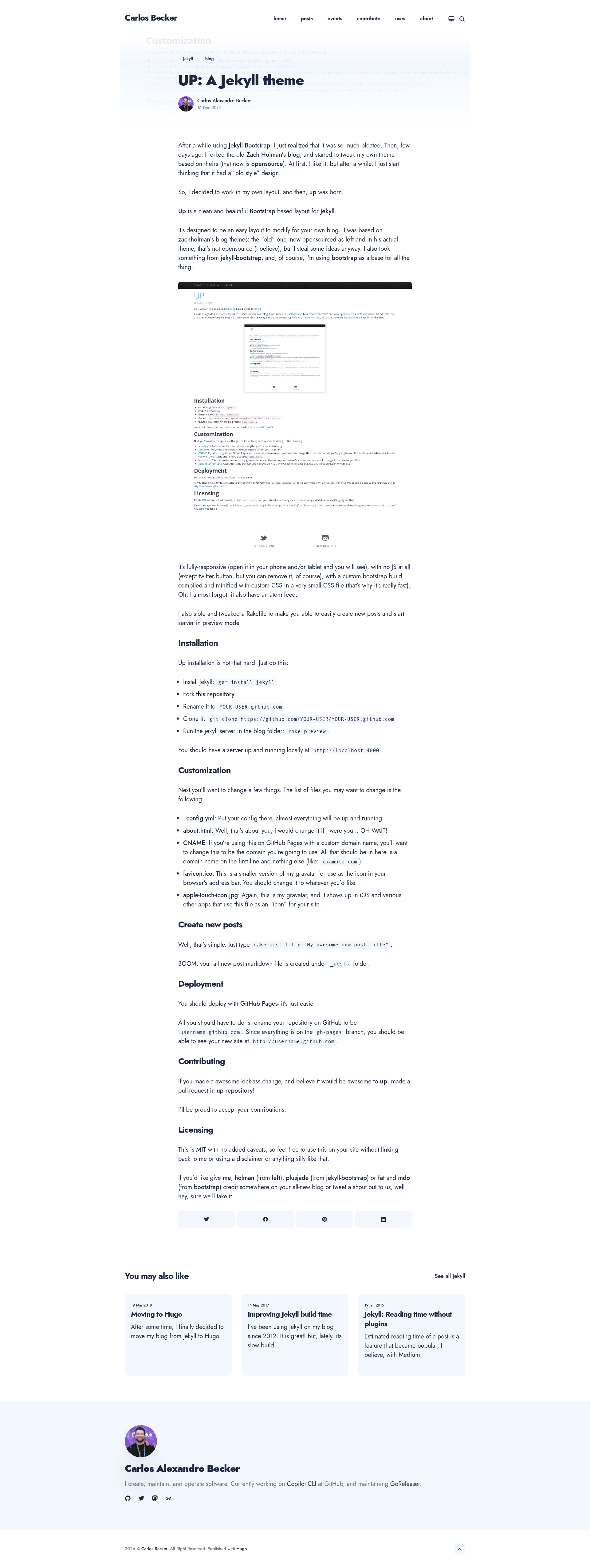
Clean and beautiful bootstrap based layout for Jekyll.
About this template
Up is an open-source Jekyll blog layout built on Bootstrap, designed to be a clean starting point for personal blogs that deploy to GitHub Pages.
What is Up?
Up is a Jekyll theme based on Bootstrap, created by Carlos Alexandro Becker (caarlos0) and inspired by Zach Holman's Left theme and jekyll-bootstrap. It takes a standard Jekyll project and gives you a working blog layout with a responsive Bootstrap grid, an about page, and GitHub Pages deployment in mind. The theme is distributed under the MIT license, so it can be reused freely without attribution.
Key Features
- Bootstrap foundation — the layout is built directly on Twitter Bootstrap, giving you the familiar grid, components, and responsive utilities.
- Simple installation — clone the repo, run
bundle && rake init, then start local development withforeman start -f Procfile.dev. - Bower-managed assets — front-end dependencies are handled by Bower, and
gruntrebuilds assets whilegrunt watchmonitors changes. - Gravatar icon generation — the
rake iconstask pulls your Gravatar (using the email in_config.yml) and generates favicon and apple-touch-icon files via RMagick. - GitHub Pages ready — rename your repo to
username.github.ioand push; the site appears at that URL. - MIT licensed — use it on any project without crediting the author.
Who is it for?
- Jekyll beginners — get a preconfigured blog layout without writing HTML from scratch.
- Bootstrap developers — customize components using the same framework you already know.
- Self-hosted bloggers — deploy to GitHub Pages with a custom domain via the included
CNAMEfile.
What can you do with Up?
- Launch a personal blog — set up a clean, Bootstrap-styled blog on GitHub Pages in minutes.
- Customize the design — edit
_config.yml, the about page, and icons, or adjust CSS/JS with Grunt. - Learn Jekyll structuring — see how to organize a Jekyll project with Bower and Grunt instead of a Jekyll asset pipeline.
How does Up work?
- Fork and clone the repository, then run
bundle && rake initto install Ruby and Node dependencies. - Start the local server with
foreman start -f Procfile.devand view it athttp://localhost:4000. - Push the repository to GitHub under your username to deploy via GitHub Pages.
Pros and cons
- Pros: free and open source, simple deployment, based on a well-known CSS framework, useful rake tasks.
- Cons: uses Bower and Grunt, which are no longer actively maintained, so the toolchain may need updates for modern Node environments.
Alternatives
- Left — Zach Holman's open-source Jekyll theme that heavily inspired Up.
- jekyll-bootstrap — a framework that helps bootstrap Jekyll sites quickly.
FAQ
Is Up free?
Yes, Up is released under the MIT license, so it is completely free to use, modify, and redistribute, even commercially.
Do I need to know Jekyll to use it?
Basic familiarity with Jekyll helps, but the README walks you through installation and customization. The theme handles most of the layout work.
Can I use a custom domain with Up?
Yes, edit the CNAME file and put your domain name on the first line, then configure your DNS records as usual for GitHub Pages.
Does Up use a Jekyll asset pipeline?
No, assets are managed with Bower and Grunt because GitHub Pages does not support Jekyll asset pipelines. This means you run Grunt locally to compile assets.